

What goes wrong when this scraper fails
Sales, recruiting, and market-research teams want structured data about companies and people — and LinkedIn is the richest source. But it is a maximally hostile target: it fingerprints sessions, rate-limits aggressively, and challenges anything that smells automated. Layered on top is the legal reality that profile data is personal data, so even a technically successful scrape can create real GDPR/CCPA exposure if you ignore lawful basis, minimization, and deletion. The right framing is not 'how do I scrape everything' but 'what public data may I lawfully collect, and how do I do it without abusing the platform.'
Why this failure mode happens
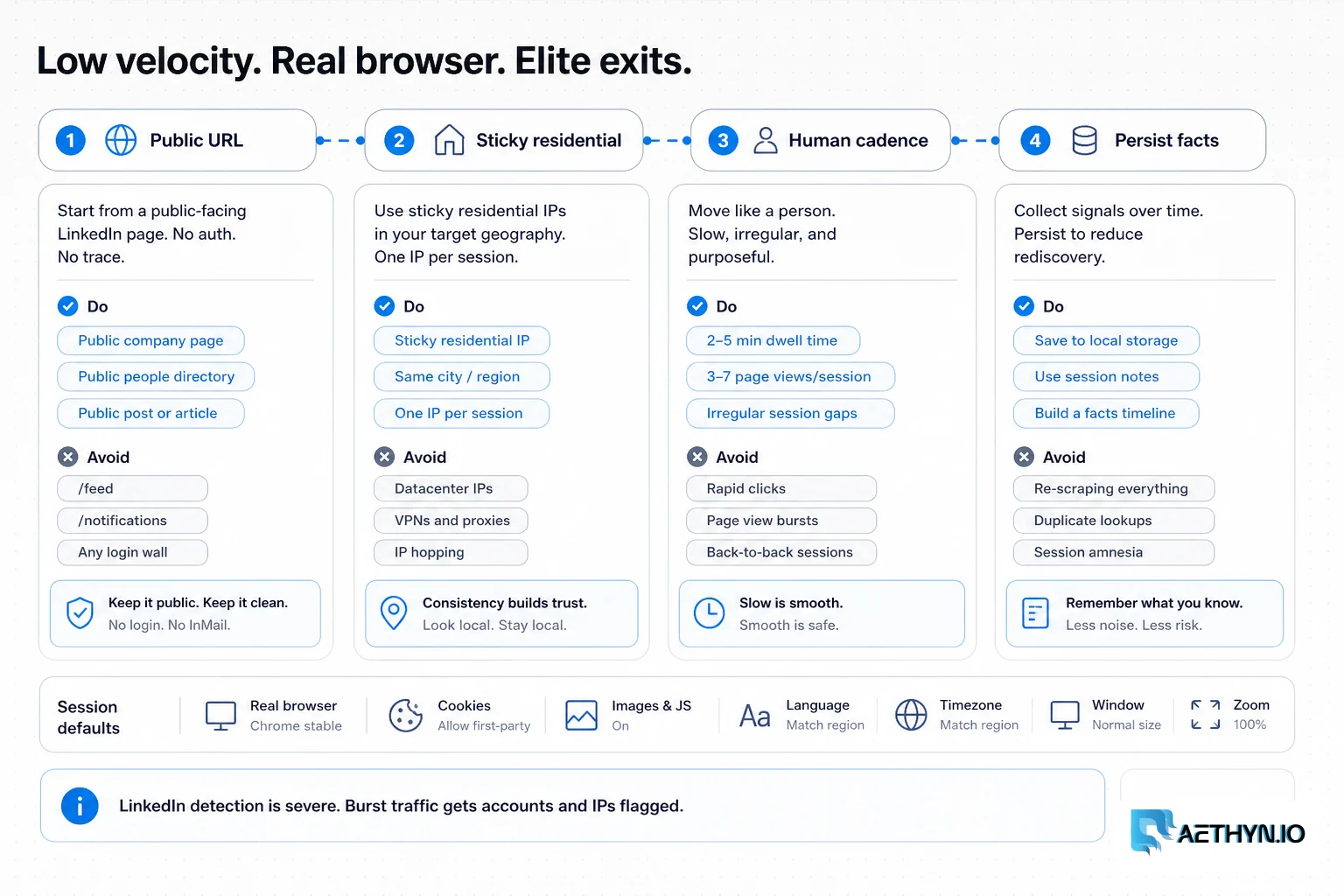
LinkedIn runs some of the most advanced anti-automation on the consumer web: session and device fingerprinting, behavioral analysis, velocity scoring, and challenges that escalate fast. Datacenter IPs are flagged on sight, and the internal 'Voyager' API that powers the site is auth-gated by design — reaching for it means logging in, which is exactly the line you should not cross. Even clean residential traffic gets blocked if it behaves unnaturally (too fast, too mechanical, no human rhythm).
Challenges that make this hard to automate
- Among the most aggressive anti-automation and rate limiting anywhere
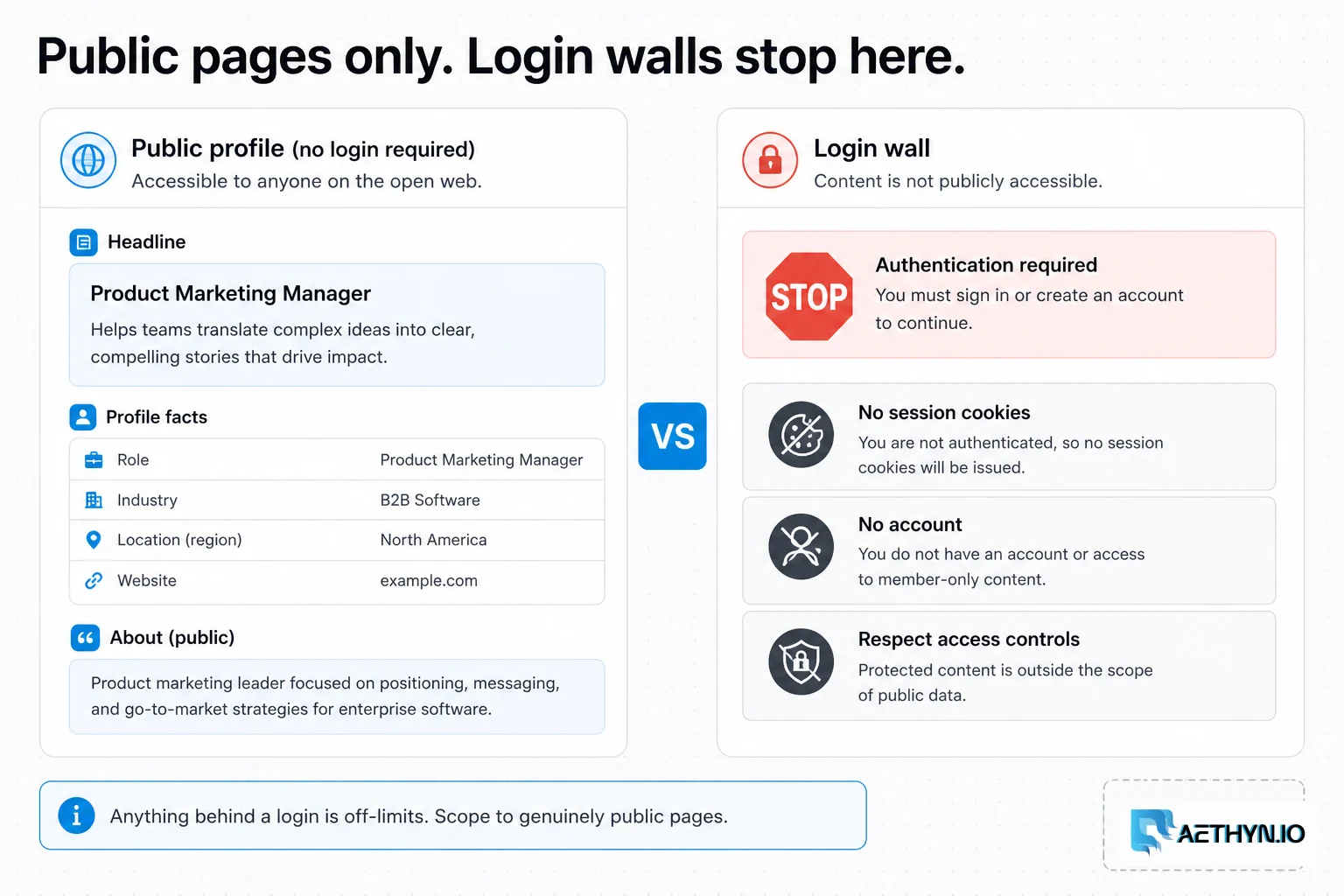
- Most useful data sits behind an authentication wall that you must not breach
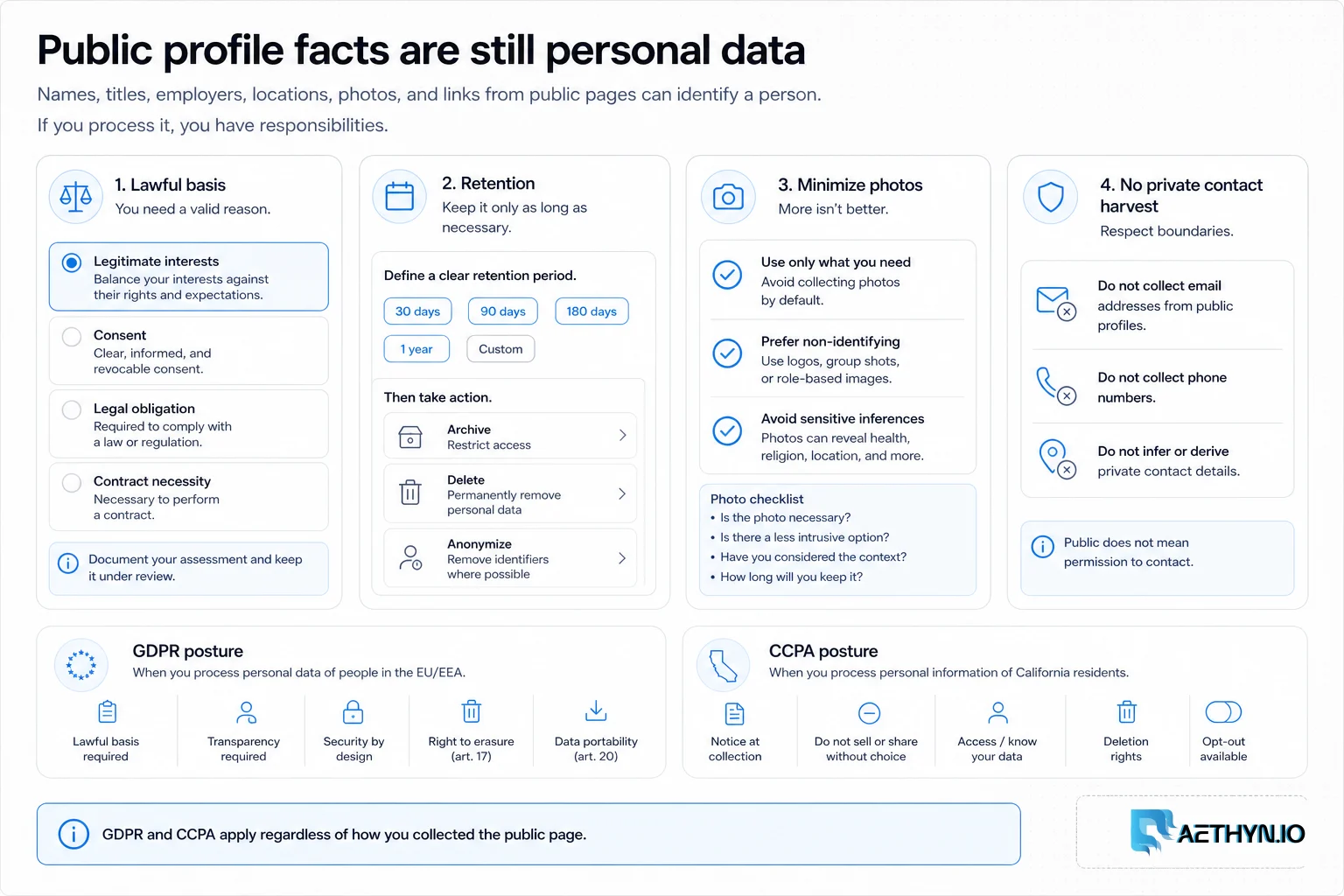
- Public profile data is still personal data, triggering GDPR/CCPA duties
- Frequent layout and markup changes that break parsers
- Easy to cross legal lines (ToS, contract, privacy) without realizing it
Approaches that usually fail
- Datacenter proxies — blocked almost immediately
- Automating logged-in accounts — breaches the User Agreement and bans the account
- Buying scraped LinkedIn datasets — opaque provenance and inherited compliance risk
- Manual collection — compliant and accurate but slow and limited in scale
When residential proxies fix this — and when they cannot
For genuinely public pages, residential proxies make requests look like ordinary visitors and, paired with a large pool and deliberately low velocity, reduce blocks. What they do not do is change your legal obligations or make logged-in automation acceptable. Used correctly, they make compliant, public-only collection more reliable — not more aggressive.
How Aethyn residential proxies help here
LinkedIn is the definition of a high-security target, so reputation and careful session control matter more here than anywhere. Aethyn provides the infrastructure; you remain responsible for staying public-only and compliant.
- Elite high-trust residential IPs for an extremely well-defended site
- Sticky sessions to keep a public browsing flow coherent and human-like
- Country targeting to match the region you're researching
- Per-request rotation for low-velocity access to public pages
- Standard auth that integrates with browser automation for rendered public pages
How to implement this with residential proxies
- 1
Decide what you may lawfully collect — before any code
This is the real first step. Limit scope to pages that are publicly visible without logging in, check LinkedIn's robots.txt and User Agreement, and treat everything you collect as personal data under GDPR/CCPA. Write down your lawful basis (e.g. legitimate interest for B2B research) and what you will not collect. If you cannot articulate the basis, that is your answer.
Field note: A useful internal test: would this collection survive a data-subject asking 'why do you have my information and how did you get it?' If the honest answer involves a login or a purchased dataset of unknown origin, stop.
- 2
Access public pages slowly through a real browser
Use the Elite residential pool, a sticky session for a coherent browsing flow, and a real browser so public pages render as they would for a visitor. Keep pacing deliberately human — seconds between actions, not milliseconds. The goal is to look like one curious person, not a fleet.
Python (Playwright)import random from playwright.sync_api import sync_playwright with sync_playwright() as p: b = p.chromium.launch(proxy={ "server": "http://proxy.aethyn.io:5499", "username": "aethyn-XXXXX-country-us-session-li1-lifetime-20", "password": "PASSWORD", }) page = b.new_page(locale="en-US") page.goto("https://www.linkedin.com/company/example/", wait_until="domcontentloaded") page.wait_for_timeout(random.randint(3000, 6000)) # human-scale pause print(page.title()) b.close()Field note: If a public page redirects you to a login/auth wall, that content is not public — do not try to get around it. The auth wall is LinkedIn explicitly telling you this data is gated.
- 3
Parse the structured public data, not brittle markup
Public company and profile pages embed structured data (JSON-LD / Open Graph) that is far more stable than the visual markup, which LinkedIn rewrites constantly. Read from that where present, and degrade gracefully when a field is missing rather than guessing from churned class names.
Python (JSON-LD)import json from bs4 import BeautifulSoup def parse_public(html): soup = BeautifulSoup(html, "html.parser") blocks = soup.find_all("script", {"type": "application/ld+json"}) for b in blocks: try: data = json.loads(b.string) except (TypeError, json.JSONDecodeError): continue if data.get("@type") in ("Organization", "Person"): return data # public, structured, relatively stable return NoneField note: Collect only the fields your use case actually needs (company, role, public headline) and drop the rest at parse time. Minimization at the point of collection is both a compliance best practice and less data to babysit later.
- 4
Pace hard, and treat any challenge as a full stop
Keep volume very low, randomize timing, and the moment you see a checkpoint, CAPTCHA, or auth wall, stop that session — do not push through. Pushing through challenges is how you escalate from a temporary block to sustained, harder detection.
- 5
Separate collection from outreach execution
Keep the public-data collection you built here strictly separate from any messaging. Store collected fields in your CRM and send outreach manually, or through channels where you have consent — never chain scraped profile data straight into a bot that clicks 'Connect' or fires an InMail sequence. Automating authenticated actions is exactly the line this guide tells you not to cross.
- 6
Minimize, document, and honor deletion
Store only what you justified in step one, attach the lawful basis and collection date, and build a path to delete a person's data on request. Under GDPR/CCPA these are obligations, not nice-to-haves — and they are far easier to design in now than to retrofit after a complaint.
Best practices that keep scrapers reliable
- Restrict scope to pages public without a login; never breach an auth wall
- Treat all collected data as personal data and document a lawful basis
- Minimize at the point of collection — keep only fields you justified
- Keep velocity very low and human-paced through a real browser
- Use Elite residential IPs and sticky sessions for coherent public flows
- Stop on any challenge, and build a deletion path from day one
- Keep public-data collection separate from messaging — never wire scraped profiles into automated connect/InMail actions
- Never batch-and-blast outreach from collected data; generic mass messaging creates CAN-SPAM and GDPR exposure
Common mistakes that burn proxy budget
- Treating LinkedIn like an unprotected site and scraping fast
- Automating logged-in accounts, breaching the User Agreement
- Assuming 'public' means 'no privacy obligations' — it doesn't
- Pushing through CAPTCHAs/checkpoints instead of stopping
- Buying scraped datasets of unknown provenance and inheriting the risk
- Hoarding more personal data than the use case actually needs
- Trusting the HTTP 200 on a login interstitial — LinkedIn often returns 200 on authwalls, so key 'is this public?' on the final URL and page content, not the status code