

What goes wrong when this scraper fails
Nearly every scraping project hits the same wall eventually: a run that worked yesterday now returns 403s, 429s, a CAPTCHA, or — most insidious — a 200 OK with stripped or altered content your parser quietly records as valid. Teams then play whack-a-mole, swapping proxies or adding random sleeps, without a model of what is actually being detected. The result is a pipeline that is perpetually one site update away from breaking.
Why this failure mode happens
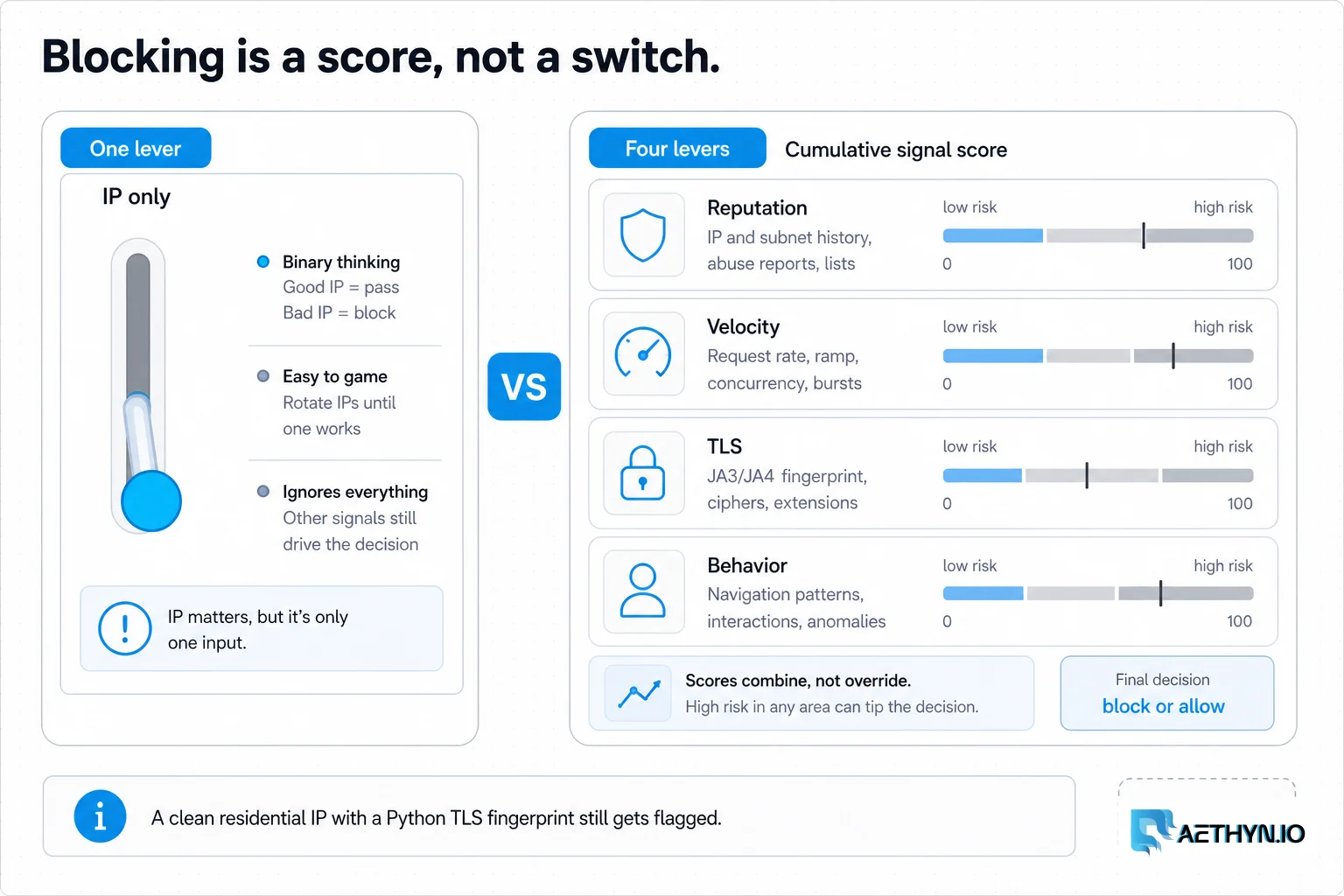
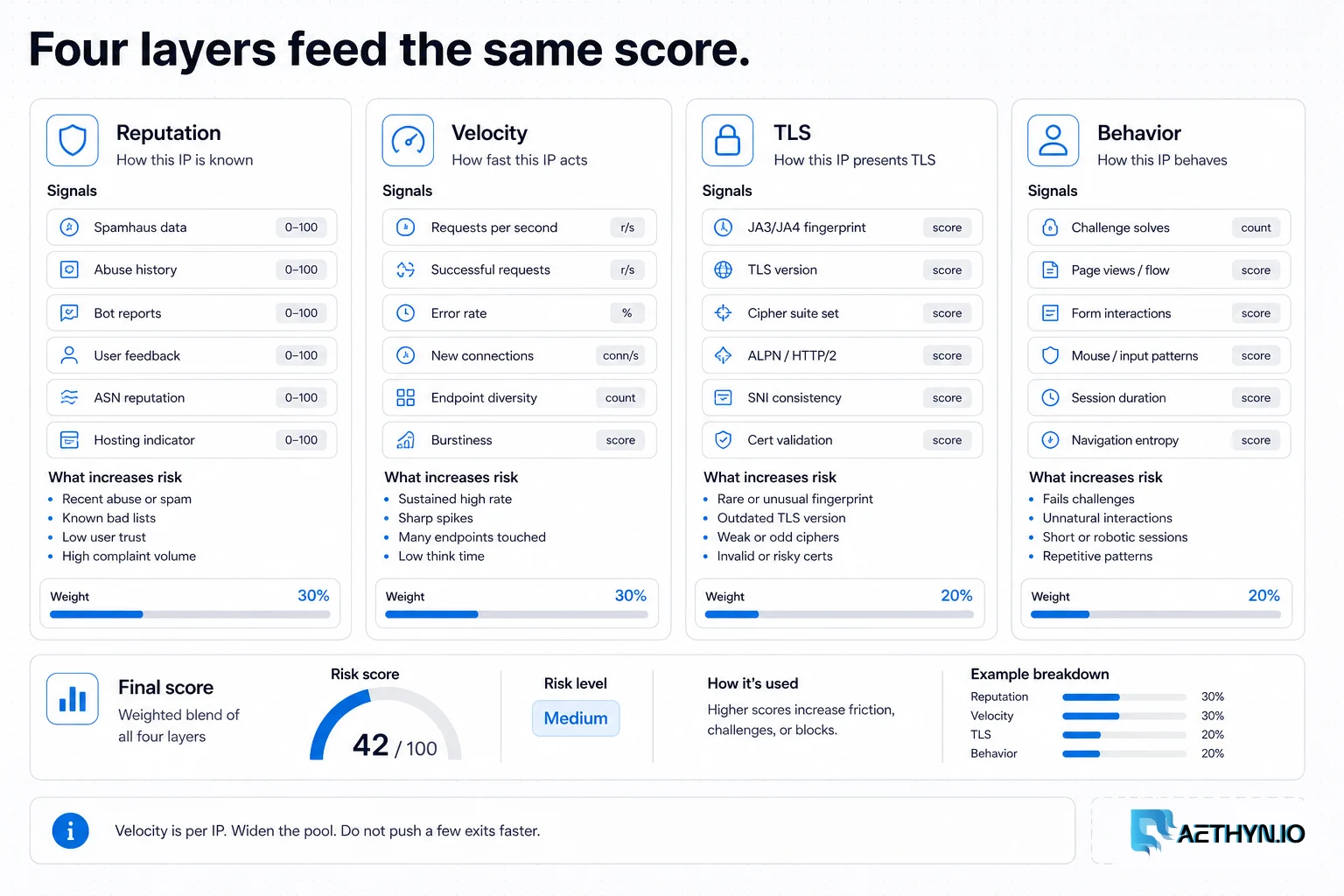
Modern anti-bot stacks (Cloudflare, Akamai, DataDome, PerimeterX) score every request across four layers. First, IP reputation: datacenter ASNs are pre-discounted and shared by thousands of scrapers. Second, velocity: how many requests an IP and subnet send, and how evenly. Third, fingerprint: your TLS handshake (JA3/JA4) and HTTP/2 frame ordering — a Python or Go client looks nothing like Chrome even with a spoofed User-Agent. Fourth, behavior: header order, cookie handling, mouse/scroll on JS pages. Cross a threshold on the weighted sum and you are challenged, regardless of how good any single signal is.
Challenges that make this hard to automate
- Datacenter IP ranges that arrive pre-flagged and throttle as a whole subnet
- Per-IP velocity thresholds that one greedy worker can trip for everyone
- TLS/JA3 and HTTP/2 fingerprints that betray non-browser HTTP clients
- Inconsistent header order, cookies, and Accept-Language that read as automation
- Soft blocks that return altered or empty data instead of an honest error code
Approaches that usually fail
- Sprinkling time.sleep() everywhere — slower, but does nothing about reputation or fingerprint
- Cycling a handful of datacenter IPs — they are flagged together as one subnet
- Randomizing only the User-Agent — ignores the TLS/HTTP fingerprint that gives you away
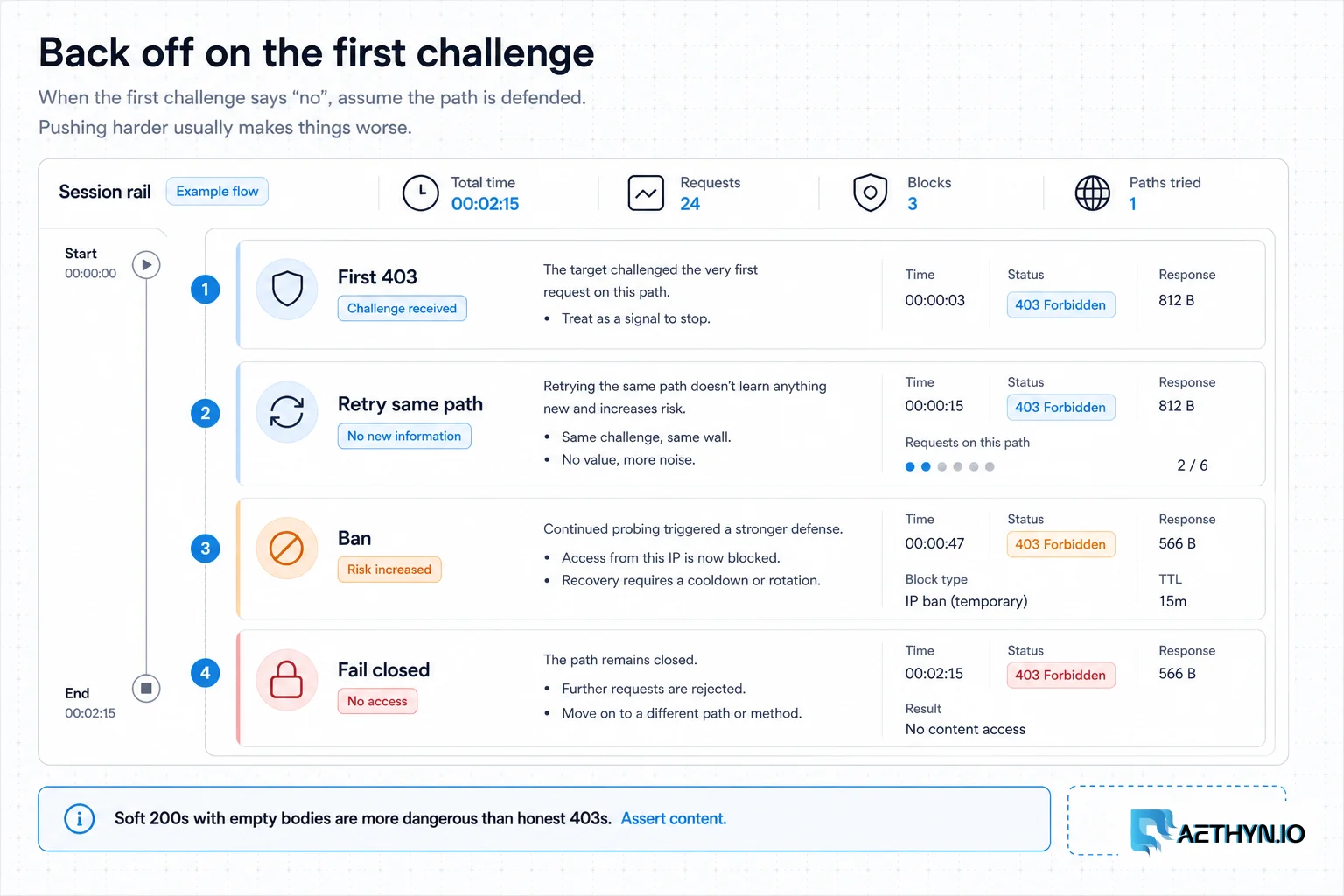
- Retrying aggressively on errors — the fastest way to escalate a throttle into a hard ban
When residential proxies fix this — and when they cannot
Residential proxies fix the reputation layer (real consumer IPs) and, just as importantly, give you a pool large enough to keep each IP's velocity near human levels. That addresses two of the four detection layers directly. Pair them with coherent headers and — for the toughest targets — a real browser engine that carries a genuine TLS fingerprint, and your requests stop standing out as a fleet of bots.
How Aethyn residential proxies help here
Reputation and velocity are the two layers a proxy network owns, and they are the two that block most scrapers. Aethyn is built around both, with rotation and stickiness controlled in the username.
- High-reputation residential IPs that begin with real-user trust, not a flagged ASN
- A large pool plus per-request rotation so per-IP velocity stays near human levels
- Sticky sessions with explicit lifetimes for flows that genuinely need continuity
- Country targeting so the exit geography is plausible for the site you hit
- Elite tier for the most aggressively defended targets (Cloudflare/Akamai-class)
How to implement this with residential proxies
- 1
Rotate IPs per request to keep velocity human-scale
Start with the layer that blocks most scrapers. Use the base username so every request exits from a fresh residential IP, which keeps per-IP velocity near what a real person generates. This is why pool size beats request speed: 100k requests across 50k IPs is invisible; 100k across 50 IPs is a siren.
Python (requests)import requests PROXY = "http://aethyn-XXXXX:PASSWORD@proxy.aethyn.io:5499" proxies = {"http": PROXY, "https": PROXY} r = requests.get("https://example.com", proxies=proxies, timeout=30) print(r.status_code)Field note: Resist the urge to find 'the safe requests-per-IP number'. There isn't one — it varies by target and time. Keep velocity low and scale by widening the pool, not by tuning a magic per-IP limit.
- 2
Match the fingerprint, not just the User-Agent
This is the step most guides skip. Even from a perfect residential IP, a plain requests or aiohttp call ships a TLS handshake (JA3/JA4) and HTTP/2 frame order that scream 'Python', so a spoofed Chrome User-Agent fools nobody. For protected targets, use a client that impersonates a real browser's TLS stack — or drive an actual browser, which carries a genuine fingerprint for free.
Python (curl_cffi)from curl_cffi import requests as cffi # Impersonates Chrome's TLS/JA3 + HTTP/2 fingerprint, not just the UA string r = cffi.get( "https://example.com", impersonate="chrome", proxies={"http": PROXY, "https": PROXY}, timeout=30, ) print(r.status_code)Field note: A good litmus test: hit a JA3-reflecting endpoint (e.g. a TLS-fingerprint check service) through your client and through Chrome. If the hashes differ wildly, the IP was never your real problem — the handshake was.
- 3
Keep headers and cookies coherent per session
Send a complete, realistic header set and keep it stable for the life of a session — don't randomize the User-Agent on every request from the same cookie jar, which is itself a tell. Reuse cookies within a sticky session; a site that sets a cookie and never sees it again knows you are not a browser.
Python (session)session = requests.Session() session.headers.update({ "User-Agent": "Mozilla/5.0 (Windows NT 10.0; Win64; x64) AppleWebKit/537.36 " "(KHTML, like Gecko) Chrome/124.0 Safari/537.36", "Accept": "text/html,application/xhtml+xml,application/xml;q=0.9,*/*;q=0.8", "Accept-Language": "en-US,en;q=0.9", "Sec-Fetch-Site": "none", })Field note: Header order matters too. Browsers send headers in a consistent order; some HTTP clients alphabetize or reorder them. Clients like curl_cffi preserve browser-like ordering, which is one less thing to give you away.
- 4
Treat the first challenge as a signal to slow down
Detect 403/429/CAPTCHA explicitly and respond by backing off with jitter, rotating to a fresh IP, and lowering concurrency — never by retrying the same request immediately. Crucially, also detect soft blocks: a 200 OK whose body is suspiciously short or missing your target selector is a block in disguise.
Python (detect + backoff)import time, random def classify(resp, marker_selector_found): if resp.status_code in (403, 429): return "hard_block" if resp.status_code == 200 and not marker_selector_found: return "soft_block" # 200 but the content you expected is gone return "ok" def backoff(attempt): time.sleep(min(60, 2 ** attempt) + random.random()) # exponential + jitterField note: Log block rate as a first-class metric and alert on it. A slow climb almost always means concurrency crept up or a target tightened defenses — catching it early beats discovering a week of corrupted data later.
- 5
Cache aggressively and request only what you need
The cheapest request is the one you never send. Cache responses, skip pages that have not changed (ETag/Last-Modified where available), and fetch only the fields you actually use. A smaller footprint is both cheaper and less detectable — fewer requests means fewer chances to trip any threshold.
Best practices that keep scrapers reliable
- Think in four layers — reputation, velocity, fingerprint, behavior — and fix the one that's failing
- Rotate per request and scale by pool width, never by per-IP speed
- Match the TLS/HTTP fingerprint (browser-impersonating client or real browser) for protected sites
- Keep headers, cookies, and order coherent for the life of a session
- Detect soft blocks (200 OK, missing content) and back off with jitter on any challenge
- Cache, skip unchanged pages, and request only what you use
- Stay within robots.txt and each site's Terms of Service
Common mistakes that burn proxy budget
- Blaming 'the IP' when the TLS/JA3 fingerprint is what's flagged
- Cycling a few datacenter IPs that throttle together as one subnet
- Randomizing the User-Agent while ignoring every other signal
- Retrying instantly on a 429 and escalating a throttle into a ban
- Recording soft-blocked (altered/empty) 200s as valid data
- Chasing a mythical 'safe' requests-per-IP number instead of widening the pool