

What goes wrong when this scraper fails
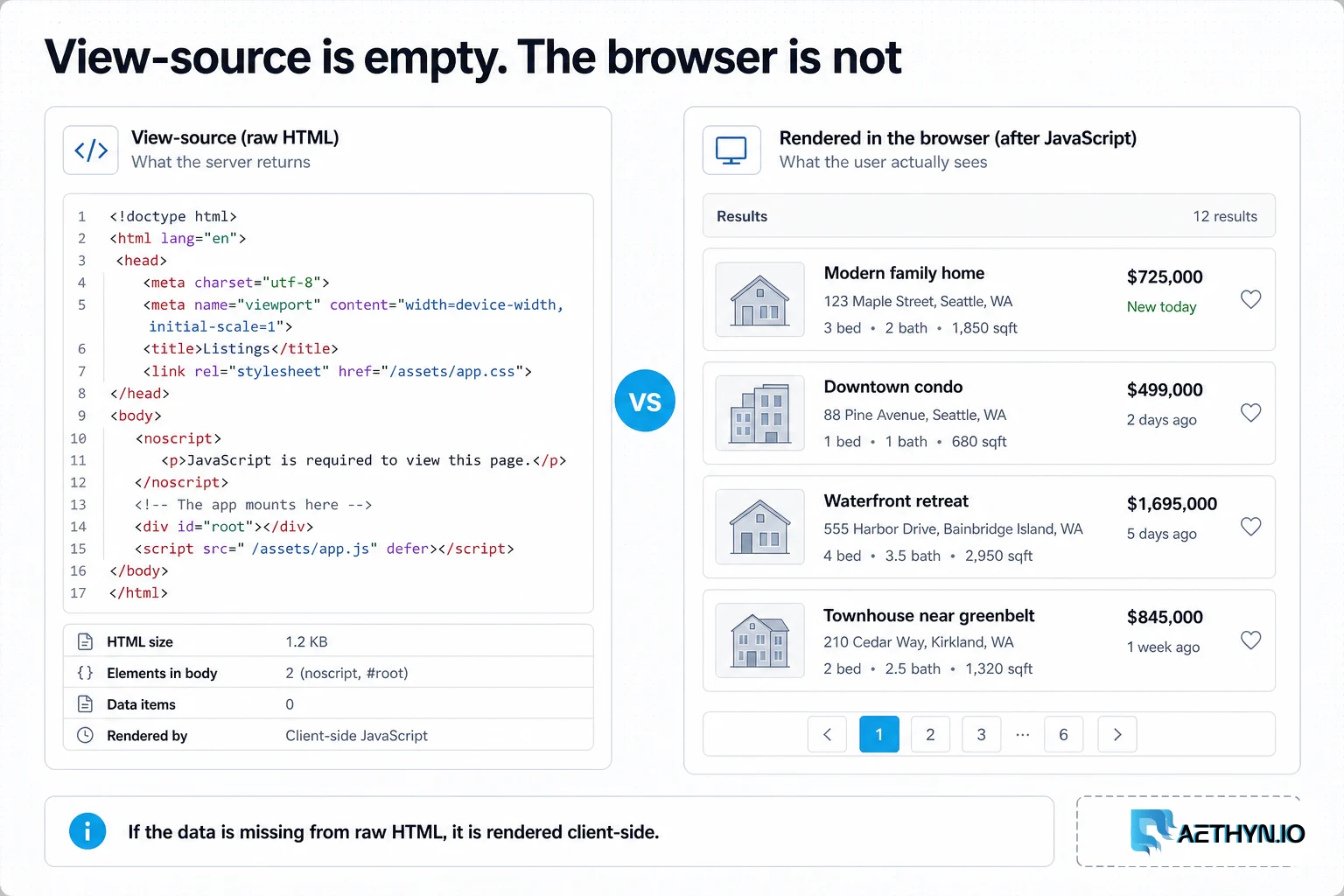
You write a scraper, it returns an HTML skeleton with no products, prices, or listings — just empty containers and a bundle of JavaScript. Single-page apps (React, Vue, Angular) and progressively-enhanced sites build their content in the browser after the initial HTML loads, often via background XHR/fetch calls. To get that data you either execute the JavaScript with a real browser engine or call the underlying API yourself — and either way you still need trustworthy IPs, because a headless browser on a datacenter IP is trivially detected.
Why this failure mode happens
Modern front-ends ship a minimal HTML shell and hydrate it client-side: the actual data arrives through JSON endpoints the page calls after load. An HTTP client like requests never runs that JavaScript, so it only ever sees the shell. Headless browsers do run it, but they also expose tells — navigator.webdriver, headless user-agent quirks, missing browser APIs — that anti-bot systems combine with IP reputation to block automated sessions.
Challenges that make this hard to automate
- Data that only exists after JavaScript executes, invisible to raw HTTP
- Infinite scroll and lazy loading that require real interaction
- Headless-browser fingerprints (navigator.webdriver and friends) that get detected
- Each rendered page costs far more CPU, memory, and bandwidth than an HTTP call
- Rotating IPs mid-session silently corrupts cookies and login state
Approaches that usually fail
- Raw HTTP requests — return the empty shell and nothing else on dynamic sites
- A headless browser on one datacenter IP — runs the JS but is blocked fast
- Hosted rendering services with no geo control — wrong-locale content and no city targeting
- Brute-forcing through full renders when a direct JSON API call would be 50x cheaper
When residential proxies fix this — and when they cannot
Pairing a headless browser (Playwright, Puppeteer, or Selenium) with residential proxies means the page executes exactly as a real user's would, from a trustworthy IP — and geo-targeting returns locale-correct content. For the API-interception approach, the same residential IPs let you call the site's internal JSON endpoints without the datacenter-IP block that would otherwise greet them.
How Aethyn residential proxies help here
Whether you render the page or call its API, the request still needs a trustworthy, geo-correct IP. Aethyn plugs into every automation framework through standard proxy auth, and the Elite pool suits the well-defended sites that tend to be JS-heavy.
- Works with Playwright, Puppeteer, and Selenium via standard username/password auth
- Elite high-trust IPs for the well-defended single-page apps that need them
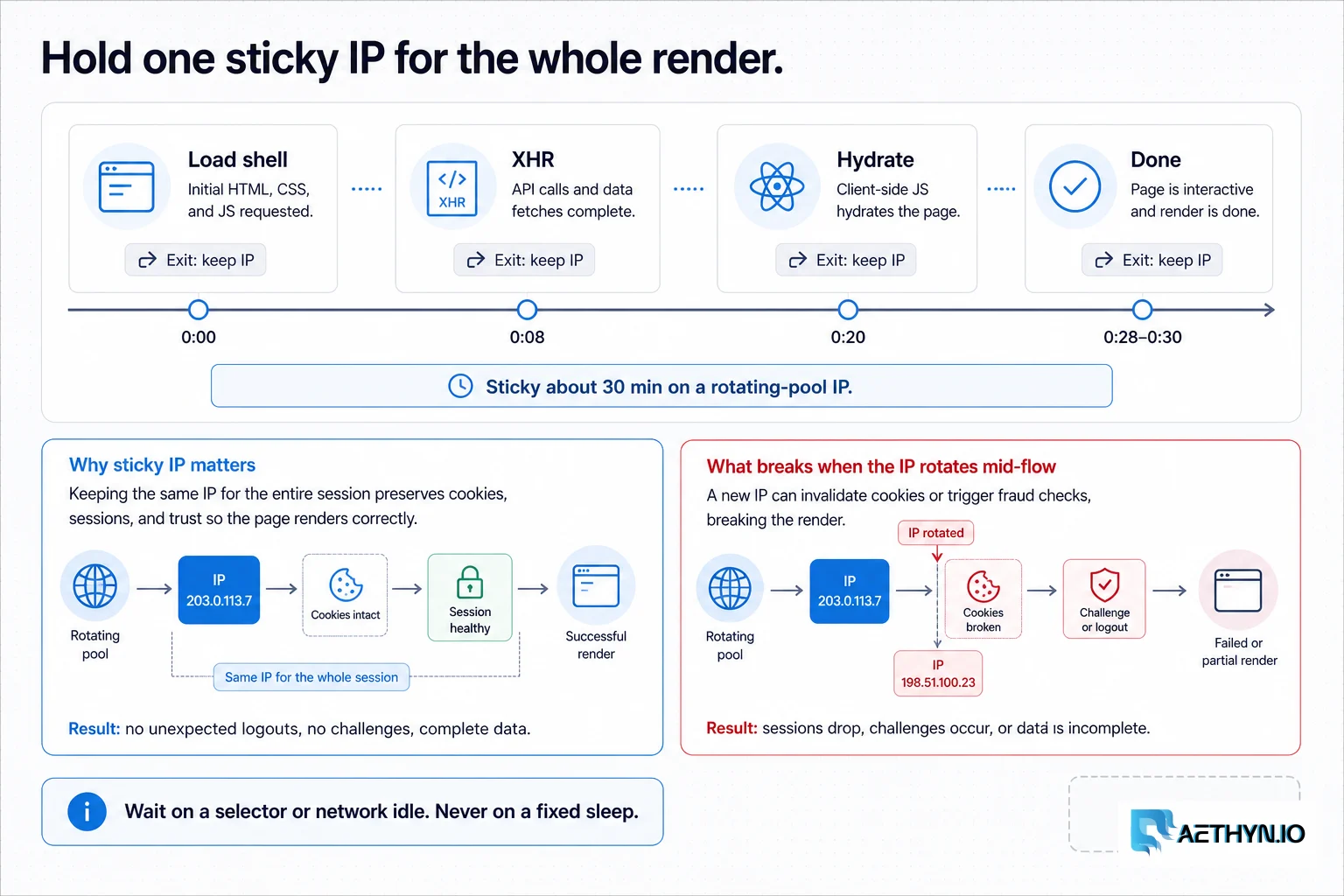
- Sticky sessions to hold one IP across an entire scroll/interaction flow
- Country/city targeting so rendered (and API) content matches the locale
- Both HTTP and SOCKS5 for whatever your browser or client expects
How to implement this with residential proxies
- 1
First, check for a hidden JSON API
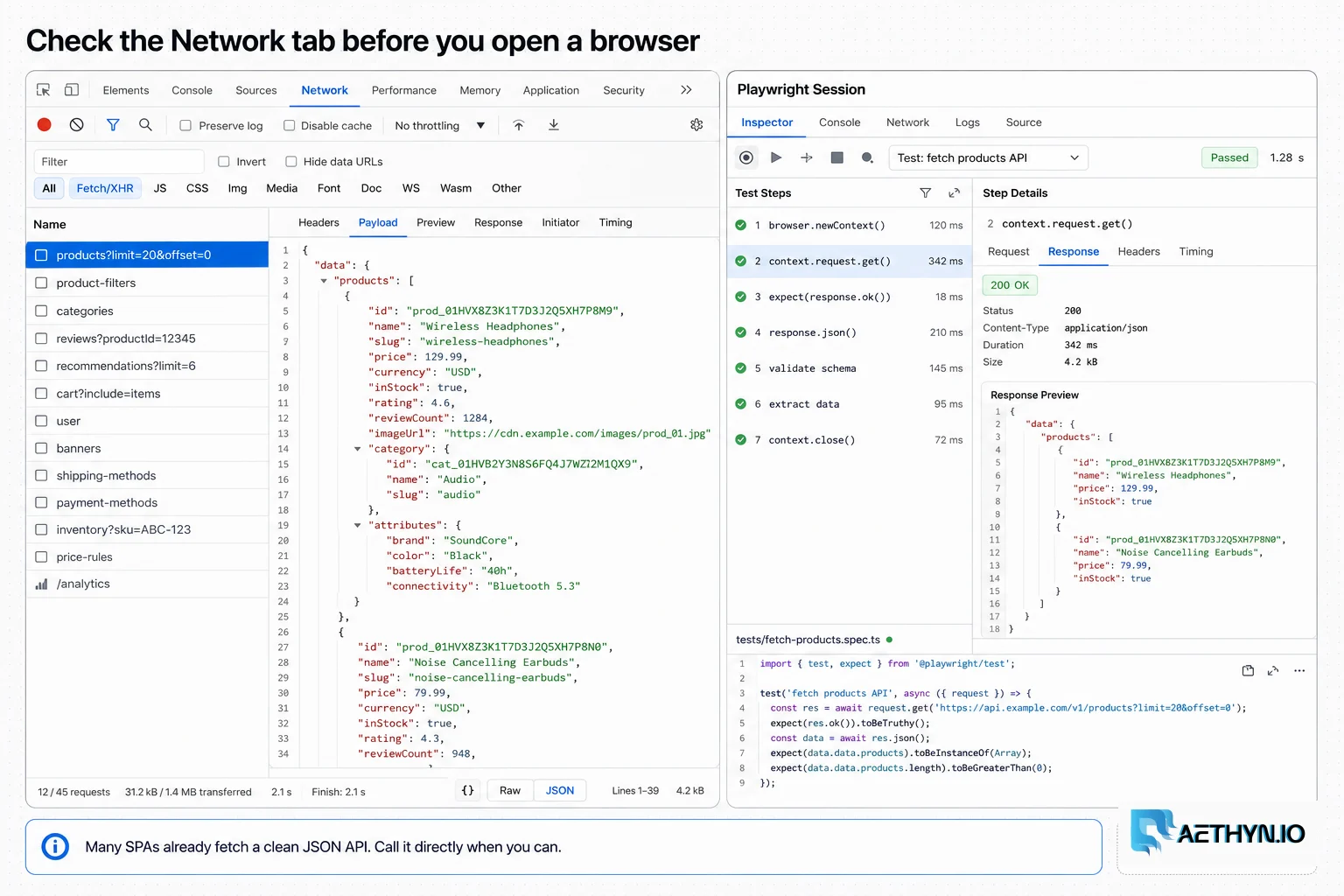
Before spinning up a browser, open DevTools → Network → Fetch/XHR and reload. Most SPAs fetch their data from a JSON endpoint you can call directly — no rendering, no DOM parsing, often a clean structured response. Replaying that request through a residential proxy is 10–50x cheaper than a full browser and far less brittle than scraping rendered HTML.
Python (call the underlying API)import requests PROXY = "http://aethyn-XXXXX-country-us:PASSWORD@proxy.aethyn.io:5499" proxies = {"http": PROXY, "https": PROXY} # The endpoint you found in the Network tab, replayed with browser-like headers r = requests.get( "https://example.com/api/v2/products?page=1", headers={"Accept": "application/json", "x-requested-with": "XMLHttpRequest"}, proxies=proxies, timeout=30, ) data = r.json() print(len(data["items"]))Field note: Copy the working request straight from DevTools as 'Copy as cURL', then strip it down to the minimum headers that still return 200. You'll usually find only one or two headers actually matter — the rest is noise you can drop.
- 2
When you must render, drive Chromium through the proxy (Playwright)
If the data really is built in the DOM (or the API is signed/obfuscated), use a headless browser. Pass the proxy at launch so the whole session shares one residential IP, and wait on an explicit selector rather than a fixed sleep.
Python (Playwright)from playwright.sync_api import sync_playwright with sync_playwright() as p: browser = p.chromium.launch(proxy={ "server": "http://proxy.aethyn.io:5499", "username": "aethyn-XXXXX-country-us-session-spa1-lifetime-15", "password": "PASSWORD", }) page = browser.new_page(locale="en-US", user_agent="Mozilla/5.0 ... Chrome/124.0 Safari/537.36") page.goto("https://example.com/app", wait_until="domcontentloaded") page.wait_for_selector(".product", timeout=15000) print(len(page.query_selector_all(".product"))) browser.close()Field note: Default headless Chromium sets navigator.webdriver=true and other tells. For defended sites use a stealth plugin (playwright-stealth / puppeteer-extra-stealth) or undetected-chromedriver — the residential IP fixes reputation, stealth fixes the automation fingerprint.
- 3
Or use Puppeteer (Node.js)
Puppeteer takes the proxy as a launch arg and authenticates per page. Prefer waitUntil: 'networkidle2' for SPAs so you don't extract before the data has arrived.
Node.js (Puppeteer)import puppeteer from "puppeteer"; const browser = await puppeteer.launch({ args: ["--proxy-server=http://proxy.aethyn.io:5499"], }); const page = await browser.newPage(); await page.authenticate({ username: "aethyn-XXXXX-country-us", password: "PASSWORD" }); await page.goto("https://example.com/app", { waitUntil: "networkidle2" }); await page.waitForSelector(".product"); console.log(await page.$$eval(".product", els => els.length)); await browser.close();Field note: networkidle2 (no more than 2 connections for 500ms) is usually the right signal for SPAs; networkidle0 can hang forever on pages with long-polling or analytics beacons that never go quiet.
- 4
Selenium with an authenticated proxy
If your stack is on Selenium, plain Chrome options can't carry user:pass for an HTTP proxy. Use selenium-wire, which handles authenticated upstream proxies cleanly while keeping the standard WebDriver API.
Python (selenium-wire)from seleniumwire import webdriver opts = { "proxy": { "http": "http://aethyn-XXXXX-country-us:PASSWORD@proxy.aethyn.io:5499", "https": "http://aethyn-XXXXX-country-us:PASSWORD@proxy.aethyn.io:5499", "no_proxy": "localhost,127.0.0.1", } } driver = webdriver.Chrome(seleniumwire_options=opts) driver.get("https://example.com/app") print(driver.title) driver.quit()Field note: For the toughest targets, swap in seleniumwire.undetected_chromedriver instead of plain Chrome — you get authenticated-proxy support and anti-detection patches in one driver.
- 5
Handle infinite scroll deterministically
For feeds that load on scroll, loop until the item count stops growing rather than guessing a number of scrolls. Wait for new items between scrolls, and cap the loop so a stuck page can't spin forever.
Python (scroll)prev, stable = -1, 0 for _ in range(100): page.mouse.wheel(0, 5000) page.wait_for_timeout(1200) count = len(page.query_selector_all(".product")) if count == prev: stable += 1 if stable >= 3: # 3 quiet rounds = genuinely the end break else: stable = 0 prev = countField note: Require a few consecutive 'no growth' rounds before declaring the end. One slow network round can momentarily stall loading, and a naive 'count didn't change once' check will truncate the feed.
- 6
Capture the data while it renders, then reuse it
You can have the best of both worlds: render the page once, but intercept the JSON responses the browser receives instead of re-parsing the DOM. Extract everything you need from a single render and only re-render when content actually changes — rendering is the expensive part.
Python (intercept responses)captured = [] def on_response(resp): if "/api/v2/products" in resp.url and resp.status == 200: captured.append(resp.json()) page.on("response", on_response) page.goto("https://example.com/app", wait_until="networkidle") # 'captured' now holds the clean JSON the SPA used to build the DOMField note: Response interception often hands you cleaner data than the DOM and survives cosmetic redesigns, since the internal API changes far less often than the markup. It's the bridge between the cheap API approach and the robust browser approach.
Best practices that keep scrapers reliable
- Check the Network tab for a JSON API before reaching for a browser
- Hold one sticky session for an entire browser flow; rotate only between sessions
- Wait on explicit selectors or network-idle, never fixed sleeps
- Add a stealth layer (playwright-stealth, undetected-chromedriver) for defended sites
- Intercept JSON responses instead of re-parsing the DOM where you can
- Render once, extract fully, and re-render only when content changes
- Target the correct country/city so rendered content matches the locale
Common mistakes that burn proxy budget
- Reaching for a headless browser when a direct API call would do
- Using raw HTTP on a JavaScript-rendered site and storing the empty shell
- Rotating the IP mid-session and silently losing cookies and login state
- Relying on fixed timeouts instead of selector or network-idle waits
- Forgetting stealth, so navigator.webdriver gives the bot away
- Running many headless browsers from one datacenter IP until blocked