

What goes wrong when this scraper fails
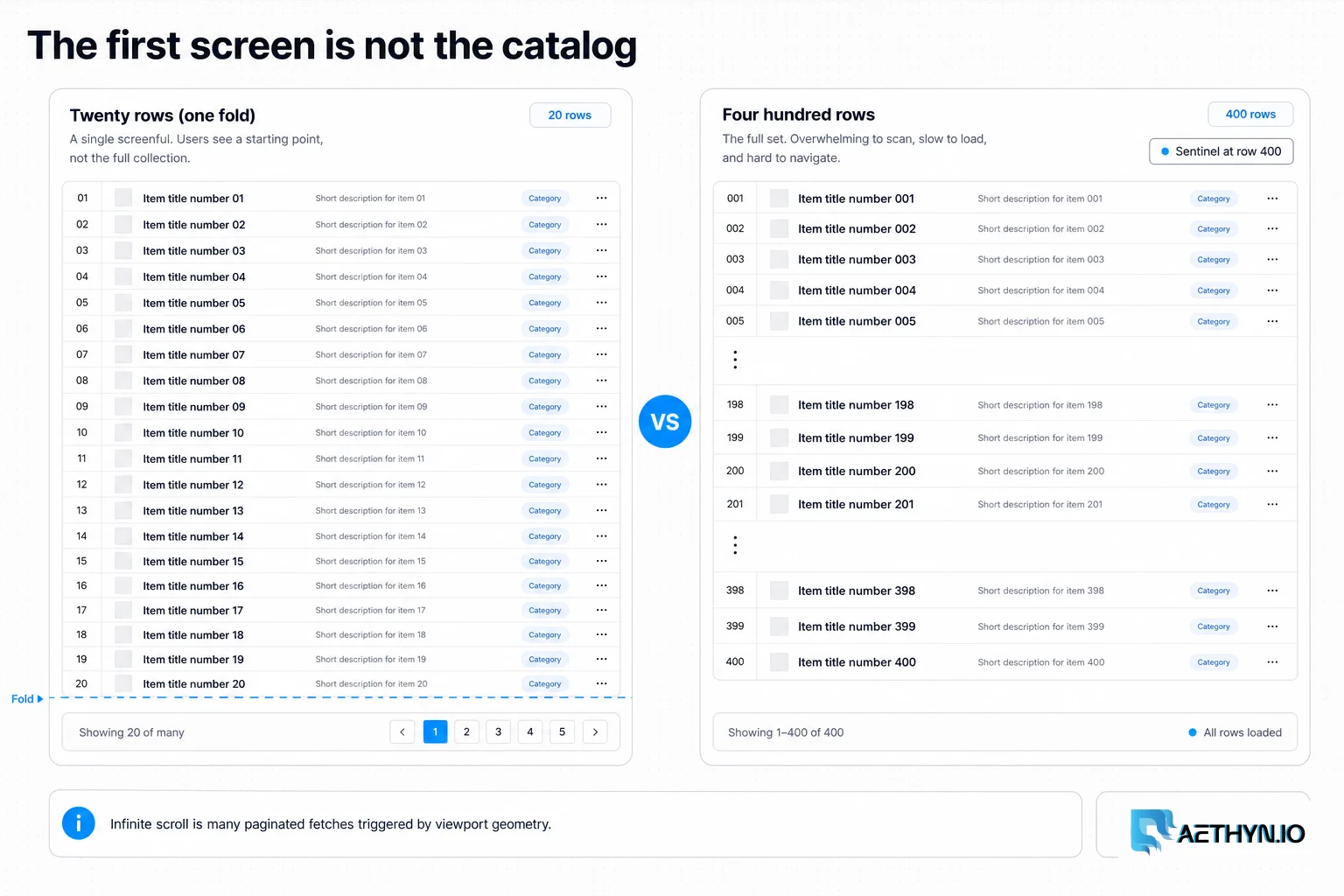
Social feeds, marketplace grids, and job boards increasingly replace pagination with scroll-triggered loading. Your first Playwright run captures twenty items and declares victory while four hundred remain below the fold. Naive page.evaluate('window.scrollTo(0, document.body.scrollHeight)') sometimes works; often it fires before listeners attach, or the site debounces scroll and coalesces requests. The result is partial datasets that bias analytics toward recent or promoted items at the top.
Why this failure mode happens
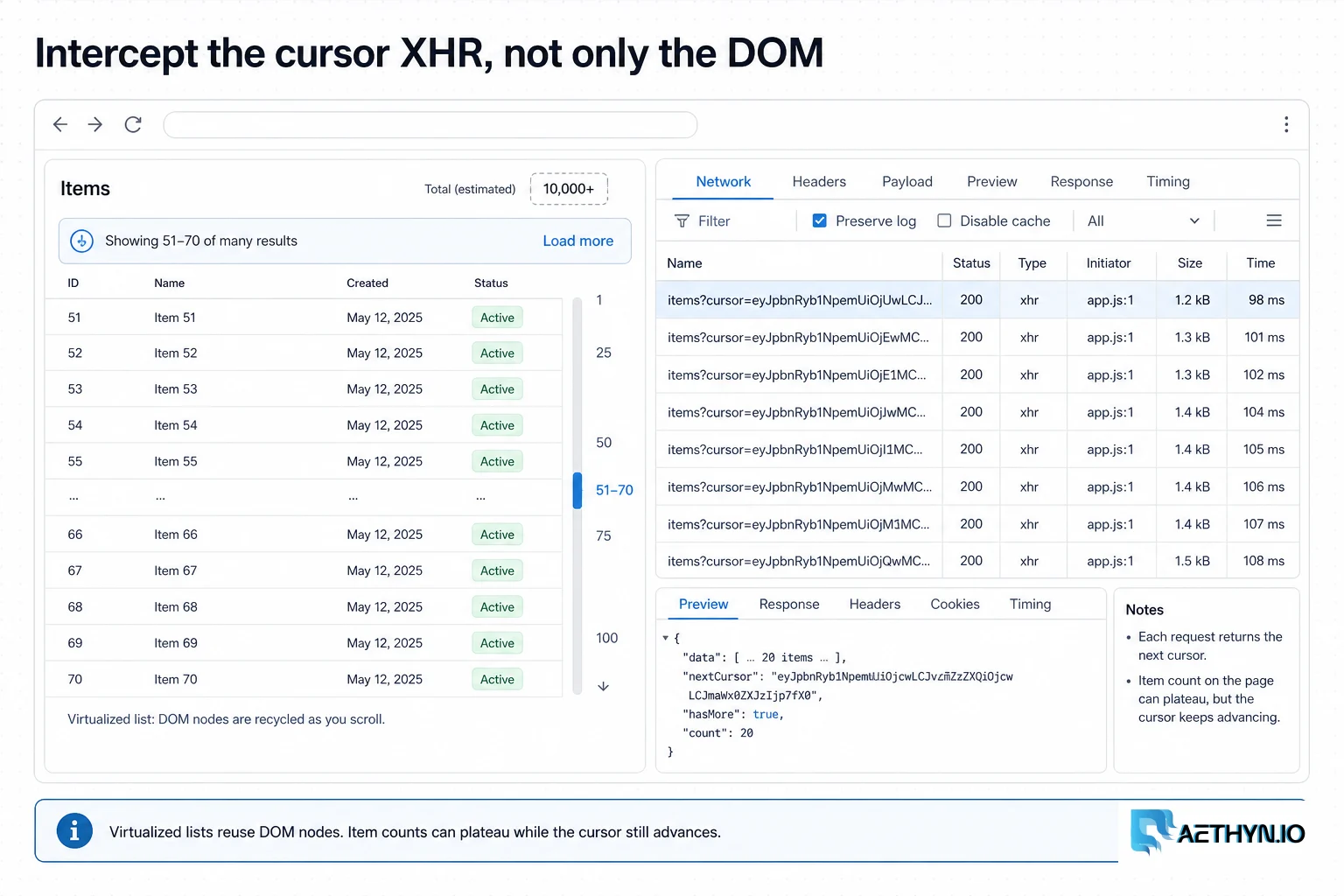
Infinite scroll is implemented with Intersection Observer callbacks or scroll event listeners that fetch the next cursor when a sentinel div becomes visible. Headless browsers that never scroll never trigger those fetches. Even when they scroll, race conditions — scrolling before the previous XHR completes — can skip pages. Some sites virtualize the DOM and remove off-screen nodes, so item counts plateau while the cursor still advances. Understanding the site's load contract is as important as the scroll mechanics.
Challenges that make this hard to automate
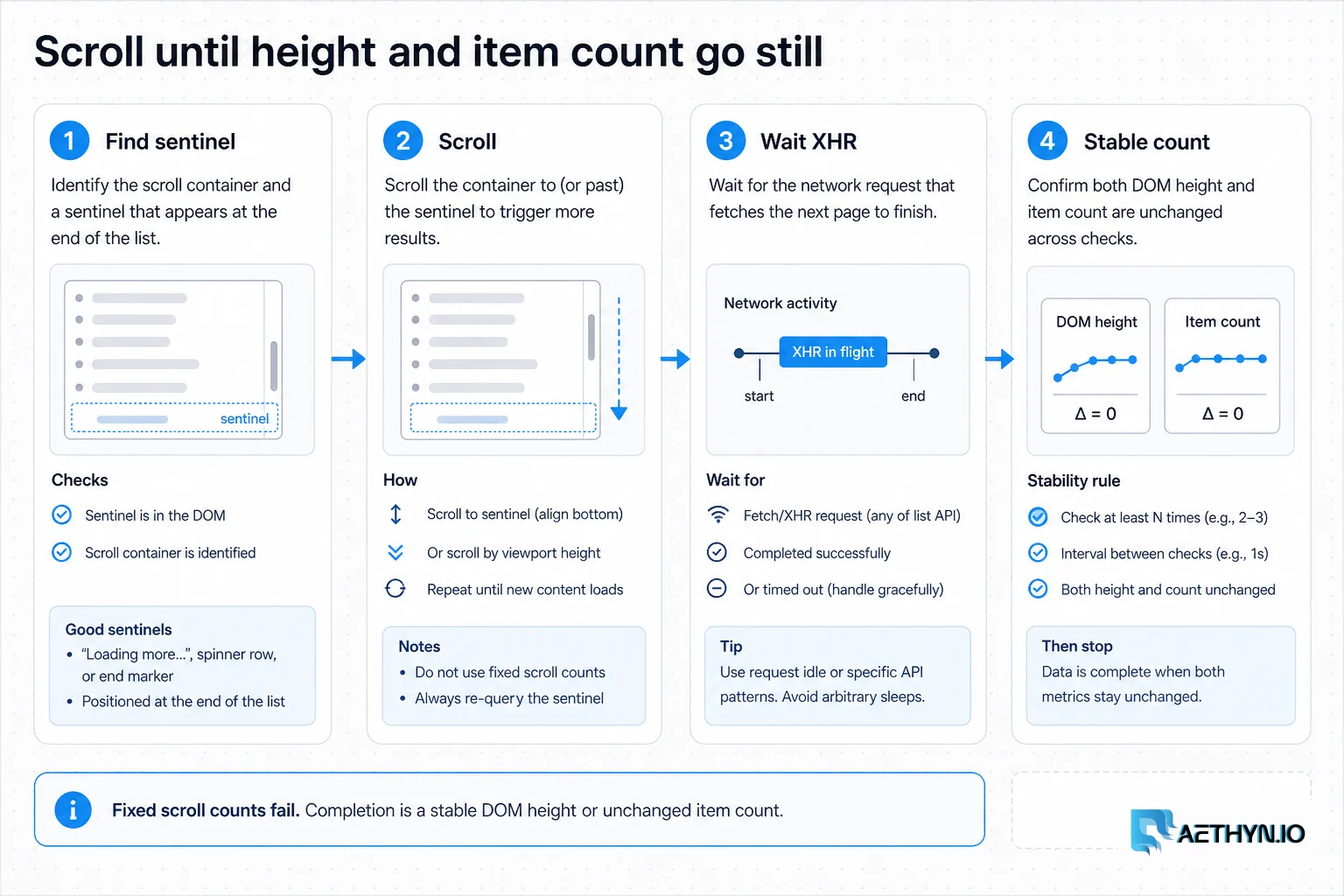
- Knowing when scrolling is complete vs temporarily idle
- Virtualized lists that reuse DOM nodes and confuse naive counting
- XHR cursors hidden in API calls rather than visible DOM
- Rate limits triggered by dozens of fetches in one long session
- Different mobile vs desktop scroll containers and breakpoints
Approaches that usually fail
- Fixed repeat scroll(0, 99999) loops — stop too early or loop forever
- Scraping only the first viewport — fast but systematically incomplete
- Guessing page= query params that the SPA ignores
- Single long session on one IP — velocity blocks mid-catalog
- Parsing rendered HTML when network JSON has the full item list
When residential proxies fix this — and when they cannot
Long scroll sessions generate many sequential fetches from one browser context. Rotating residential IPs per catalog URL (or per N scroll batches on multi-listing crawls) spreads that velocity. For single deep scrolls, a sticky session keeps cookies coherent while Premium pool breadth handles multi-URL crawls across a site.
How Aethyn residential proxies help here
Infinite scroll workloads are browser-heavy but not always Elite-tier targets. Premium on port 2099 balances cost with rotation breadth for catalog-scale scroll crawls.
- Premium residential rotation (port 2099) for multi-listing crawl jobs
- Sticky sessions when one scroll flow needs consistent cookies
- Country targeting for geo-specific infinite feeds
- Standard Playwright proxy config on a single host
- Per-byte metering — intercept JSON responses to avoid downloading full image payloads
How to implement this with residential proxies
- 1
Identify the load trigger: scroll sentinel vs API cursor
Open DevTools, scroll manually, and watch Network for XHR/fetch calls. Note cursor/limit/offset parameters. If requests carry the data, intercept them in Playwright rather than scraping cards from the DOM.
Field note: Filter Network by Fetch/XHR before scrolling — the first new request after scroll often reveals the cursor API pattern.
- 2
Scroll until item count or height stabilizes
Loop: scroll the list container to bottom, wait for network idle or a selector count increase, compare item count to previous iteration. Break when count unchanged after two passes. Prefer scrolling the overflow container element, not window, on nested feeds.
Python (Playwright scroll loop)from playwright.sync_api import sync_playwright with sync_playwright() as p: browser = p.chromium.launch(proxy={ "server": "http://proxy.aethyn.io:2099", "username": "aethyn-XXXXX-country-us", "password": "PASSWORD", }) page = browser.new_page() page.goto("https://shop.example/category/shoes", wait_until="networkidle") prev = 0 stable = 0 while stable < 2: page.locator("[data-testid='product-card']").last.scroll_into_view_if_needed() page.wait_for_timeout(1500) count = page.locator("[data-testid='product-card']").count() stable = stable + 1 if count == prev else 0 prev = count print("items:", prev) browser.close()Field note: Virtualized lists cap DOM node count while the cursor still advances — if count plateaus early, switch to network interception for the cursor API.
- 3
Hook Intersection Observer for sentinel visibility
Some sites only fetch when a specific sentinel enters view. Inject a small script to observe the sentinel and await a custom event, or use page.wait_for_selector on the loading spinner disappearing.
JavaScript (in-page observer)await page.evaluate(() => new Promise((resolve) => { const sentinel = document.querySelector("[data-infinite-scroll-sentinel]"); if (!sentinel) return resolve("no-sentinel"); const io = new IntersectionObserver((entries) => { if (entries[0].isIntersecting) resolve("visible"); }, { root: document.querySelector("main"), threshold: 0.1 }); io.observe(sentinel); window.scrollTo(0, document.body.scrollHeight); }));Field note: Match root to the site's scroll container — observing against document when the list scrolls inside a div never fires.
- 4
Intercept JSON responses for structured extraction
Register page.on('response') for URLs matching the cursor API. Append items to a list as responses arrive. This avoids re-parsing the DOM on every scroll and captures fields not rendered in cards.
Python (response handler)items = [] def on_response(resp): if "/api/listing" in resp.url and resp.status == 200: items.extend(resp.json().get("products", [])) page.on("response", on_response) # ... run scroll loop ... print(len(items))Field note: Deduplicate by product ID in the handler — overlapping scrolls sometimes re-fetch the previous page.
- 5
Cap scroll depth and rotate between listing URLs
Set a max scroll iterations guard to avoid infinite loops on broken sites. When crawling many category URLs, open a fresh context (or rotate proxy) per category so one marathon session does not concentrate velocity on one IP.
Best practices that keep scrapers reliable
- Detect scroll completion by stable counts, not fixed iterations
- Scroll the correct overflow container, not always window
- Prefer network interception when cursor APIs exist
- Deduplicate items in the response handler
- Set max-iteration guards against runaway loops
- Rotate proxies between heavy listing URLs
Common mistakes that burn proxy budget
- Scraping only the first screen of results
- Scrolling window when the list is in a nested div
- No stability check — infinite loop on loading spinners
- Ignoring virtualized DOM that caps visible nodes
- One IP for hundreds of scroll-triggered XHRs
- Parsing DOM when JSON responses contain fuller data