

What goes wrong when this scraper fails
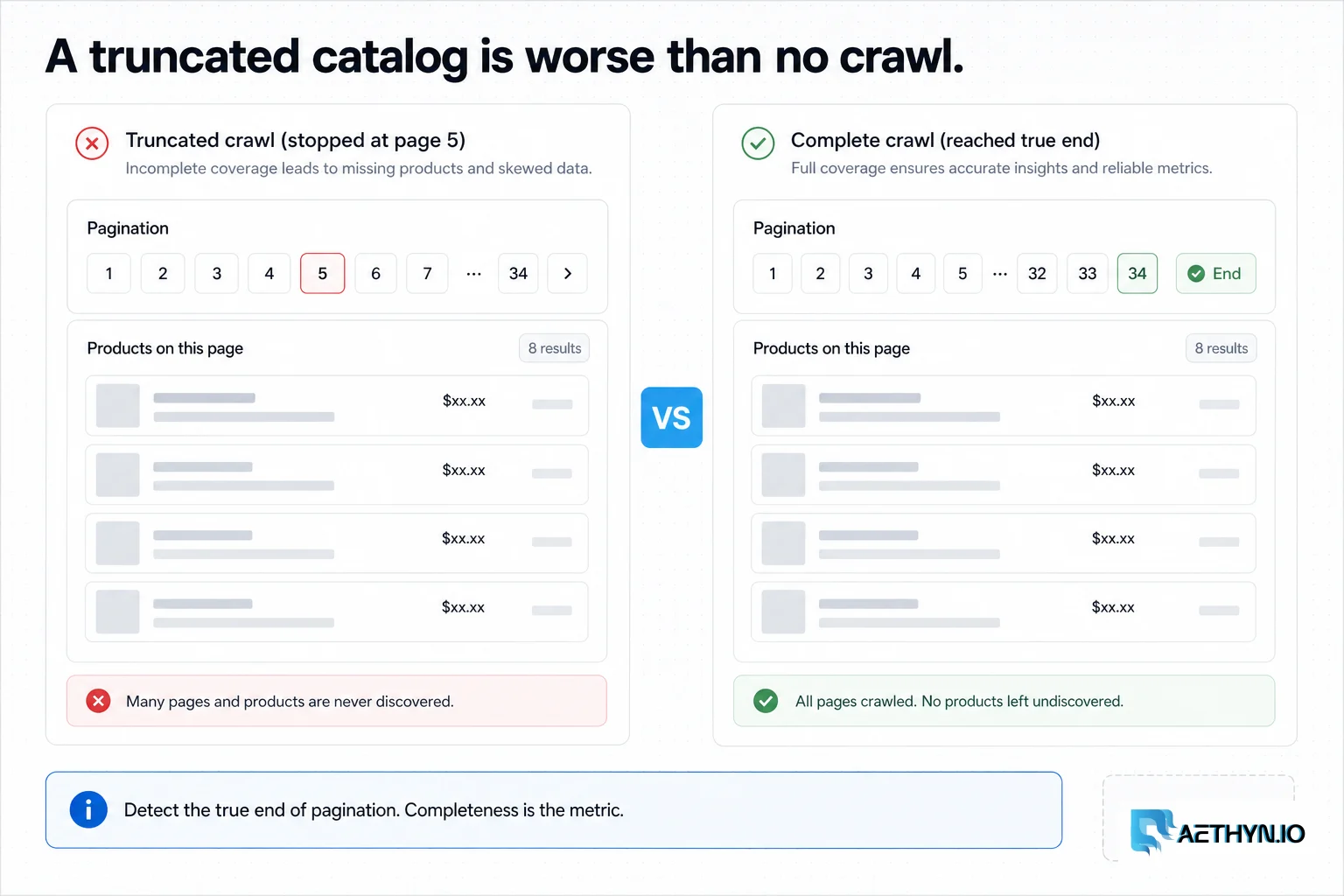
A comparison site, a merchandising analytics tool, or a brand monitoring its distribution all need the same thing: a complete, structured snapshot of many stores' catalogs — titles, prices, currencies, images, variants, and availability. E-commerce sites make this hard on purpose. They paginate deeply and inconsistently, localize price and stock by region, structure variants differently on every platform, and throttle repetitive automated access. The result for a naive crawler is partial catalogs (pagination quietly truncated), wrong-region data, and variant fields mashed together — data that looks fine until someone checks it against the live site.
Why this failure mode happens
Stores protect catalogs with rate limits and bot detection, and they localize price and availability by the visitor's region, so crawling from a few datacenter IPs both gets throttled and returns the wrong locale. On top of that, the front-end is built on platforms (Shopify, Magento, custom SPAs) that each express pagination and variants differently, so a parser tuned to one store breaks on the next — and a crawler that doesn't detect the genuine end of a category silently stops collecting.
Challenges that make this hard to automate
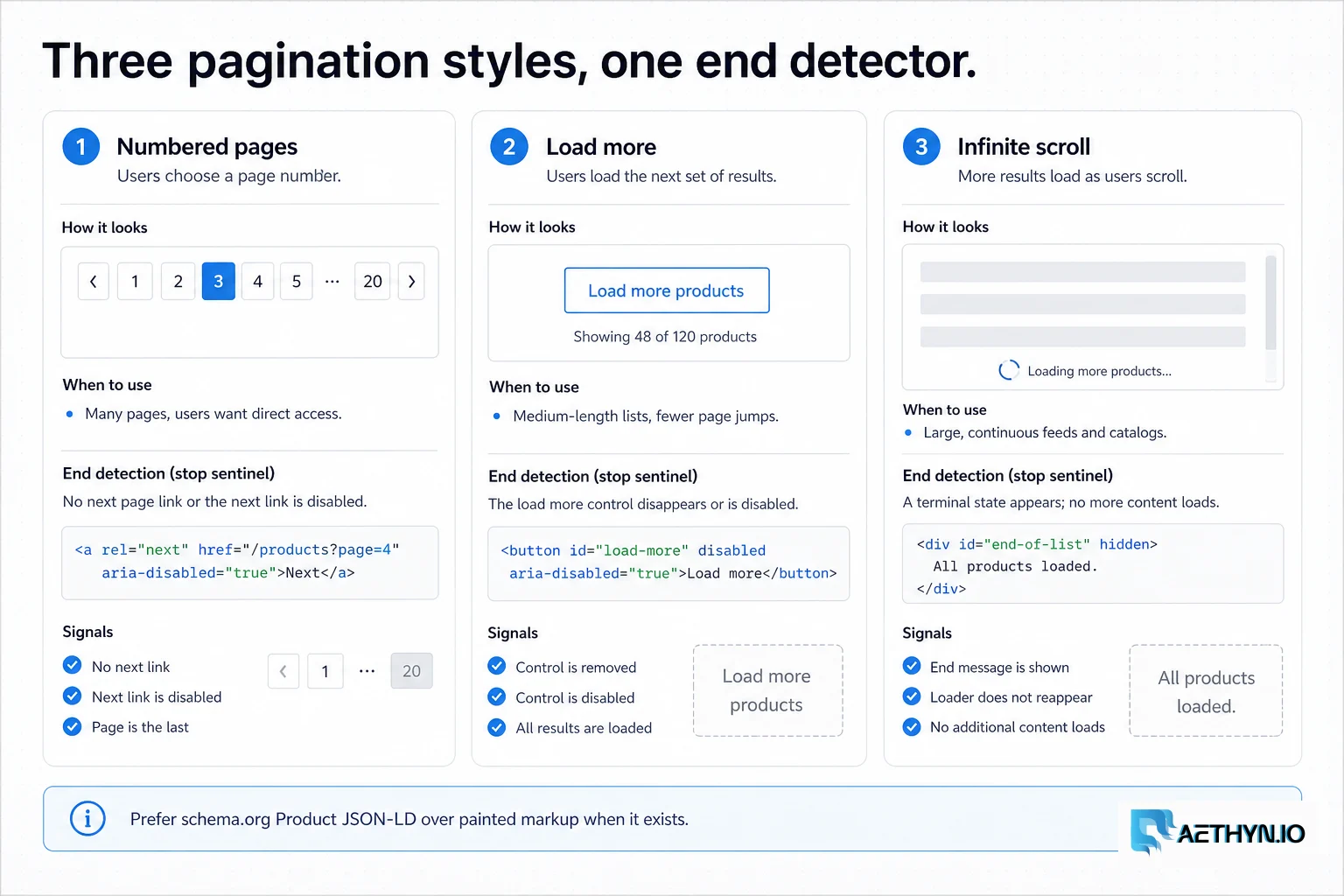
- Traversing deep category trees and three different pagination styles
- Detecting the true end of a listing rather than truncating early
- Localized price, currency, and availability by region
- Variant/option structures that differ on every platform
- Anti-bot defenses triggered by repetitive, high-volume catalog access
Approaches that usually fail
- Datacenter proxies — throttled mid-catalog and serving the wrong geography
- A single-IP crawler — blocked partway through a large category
- Platform APIs — not always available, complete, or covering competitors' stores
- Manual exports — impossible to keep current across many stores
When residential proxies fix this — and when they cannot
Residential proxies make catalog crawls look like ordinary local shoppers and return the correct regional price and availability, while rotation across a large pool lets you traverse deep pagination and many categories without any single IP tripping a rate limit. That's what turns 'we crawled most of it' into a reliably complete catalog snapshot.
How Aethyn residential proxies help here
Catalog crawling is high-volume, recurring, and geo-sensitive — the Premium tier's sweet spot, with the same endpoint scaling across many stores and regions.
- Premium pool sized for cost-efficient, high-volume catalog crawls
- Country targeting so localized price and availability are captured correctly
- Per-request rotation to traverse deep pagination without throttling
- Sticky sessions for cart- or zip-gated availability checks
- Per-byte billing that keeps large, repeated catalog pulls predictable
How to implement this with residential proxies
- 1
Map the category tree, then collect product URLs
Start from the category structure (often in the nav or a sitemap.xml) so you crawl the catalog systematically rather than guessing URLs. For each category, collect product links with IPs rotating per request. Many stores expose a sitemap that lists every product URL directly — always check for it first; it's the cleanest, most complete source of URLs.
Python (requests + parsing)import requests from bs4 import BeautifulSoup PROXY = "http://aethyn-XXXXX-country-us:PASSWORD@proxy.aethyn.io:2099" proxies = {"http": PROXY, "https": PROXY} def product_links(category_url): html = requests.get(category_url, proxies=proxies, timeout=30).text soup = BeautifulSoup(html, "html.parser") return [a["href"] for a in soup.select("a.product-card, a[href*='/product/']")]Field note: Check /sitemap.xml and /robots.txt before writing a crawler. A product sitemap gives you every URL without traversing pagination at all, and robots tells you what the site asks you not to crawl.
- 2
Handle the store's pagination style — and detect the real end
There are three common styles: numbered pages (?page=N), a 'load more' button (a background API call), and infinite scroll. Identify which the store uses. The critical part is detecting the genuine end: stop when a page yields no new products, not after a fixed count, or you'll silently truncate large categories.
Python (pagination)def crawl_category(base, max_pages=200): seen, empty_streak = set(), 0 for page in range(1, max_pages + 1): found = set(product_links(f"{base}?page={page}")) new = found - seen if not new: empty_streak += 1 if empty_streak >= 2: # two consecutive no-new-items pages = end break else: empty_streak = 0 seen |= new return seenField note: For 'load more' and infinite scroll, open the Network tab — the button or scroll almost always calls a paginated JSON endpoint you can hit directly (with cursor/offset), which is faster and more reliable than driving a browser to click.
- 3
Extract from schema.org/Product JSON-LD
Most modern storefronts embed a schema.org Product block in JSON-LD for SEO. It gives you name, price, currency, availability, and often SKU in a structured form that survives visual redesigns. Parse that first and fall back to DOM selectors only for fields it omits.
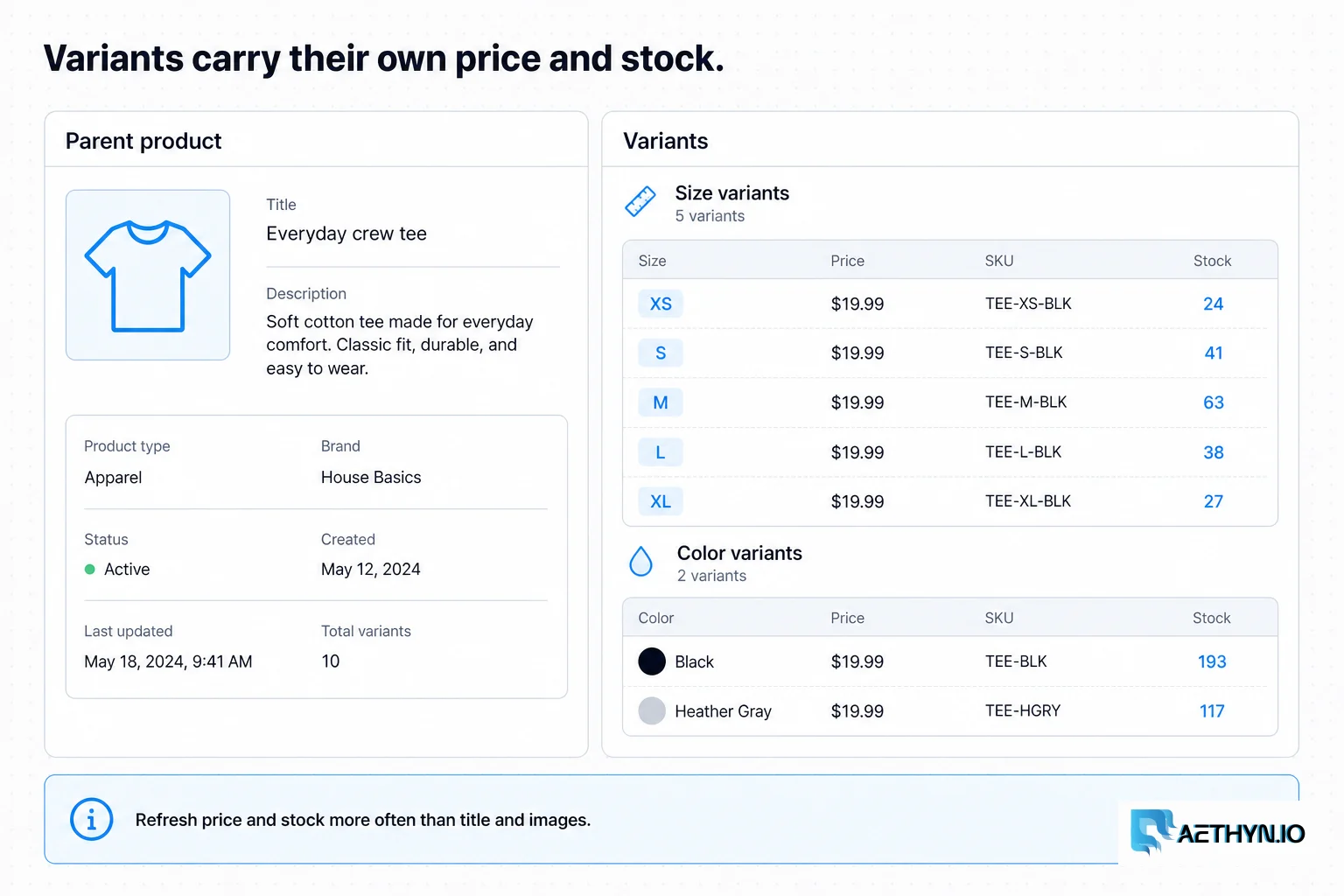
Python (JSON-LD product)import json from bs4 import BeautifulSoup def parse_product(html): soup = BeautifulSoup(html, "html.parser") for tag in soup.find_all("script", {"type": "application/ld+json"}): try: data = json.loads(tag.string) except (TypeError, json.JSONDecodeError): continue if isinstance(data, dict) and data.get("@type") == "Product": offers = data.get("offers", {}) return { "sku": data.get("sku"), "name": data.get("name"), "price": offers.get("price"), "currency": offers.get("priceCurrency"), "availability": offers.get("availability"), # e.g. .../InStock } return NoneField note: When offers is a list rather than a single object, that's the variant signal — each entry is usually a size/color with its own price and availability. Don't collapse it to one number; model the variants.
- 4
Model variants explicitly and dedupe on SKU
A single product page often represents many buyable variants (size, color), each with its own SKU, price, and stock. Store them as child records under the product, and dedupe everything on SKU/product id rather than title — names repeat and titles drift, but identifiers are stable.
Field note: Capture the variant axes (size, color) as structured attributes, not just a concatenated label. 'Red / XL' as one string is unsearchable; {color: red, size: XL} lets you analyze price-by-size or stockouts-by-color later.
- 5
Refresh incrementally by field volatility
Re-crawl volatile fields (price, availability) on a frequent cadence and static fields (description, images, specs) rarely. Store deltas with timestamps so analytics can see stockouts and price moves over time, and so you're not re-downloading unchanged descriptions every run.
Best practices that keep scrapers reliable
- Check sitemap.xml/robots.txt first — a product sitemap beats crawling pagination
- Detect the true end of a listing; stop on no-new-items, not a fixed count
- Parse schema.org/Product JSON-LD before falling back to DOM selectors
- Model variants as structured child records and dedupe on SKU
- Set country so localized price and availability are correct
- Refresh volatile fields often, static fields rarely, and store deltas
Common mistakes that burn proxy budget
- Stopping pagination after a fixed page count and truncating large categories
- Scraping brittle visual markup instead of the embedded Product JSON-LD
- Collapsing variants into one price/stock instead of modeling each SKU
- Deduping on product name, merging distinct items that share a title
- Ignoring localized currency and availability from a single vantage point
- Crawling an entire catalog from one IP until it's throttled