

What goes wrong when this scraper fails
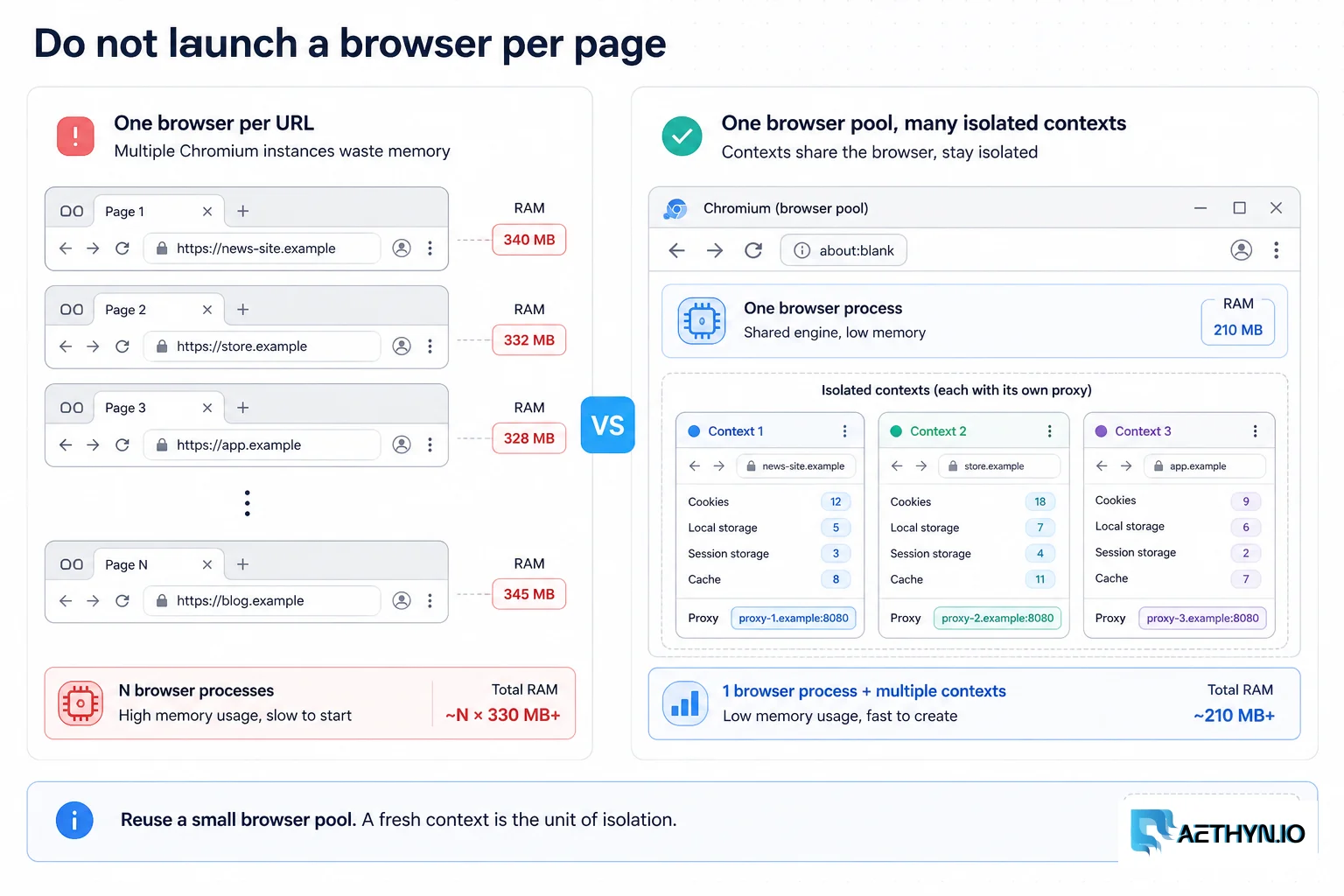
A scraper that works on one page with Playwright falls apart at scale. Launching a browser per URL exhausts RAM and CPU; running everything through one IP gets the whole job blocked; and loading full pages — images, fonts, video, trackers — burns proxy bandwidth and time on bytes you discard. The result is a slow, expensive, crash-prone crawler. Scaling Playwright is really about resource discipline: reusing browsers, isolating per-job state in contexts, trimming what loads, and bounding concurrency.
Why this failure mode happens
Each Chromium instance is heavy, so one-browser-per-page multiplies memory until the host thrashes or the OOM killer fires. Playwright's contexts are designed for isolation (separate cookies/storage/proxy), but if you don't use them deliberately, jobs leak state into each other or share one IP. And by default a browser loads every asset on a page; at scale those bytes dominate both runtime and proxy cost even though a scraper rarely needs the images or fonts.
Challenges that make this hard to automate
- Memory and CPU blowups from launching too many browsers
- Sharing one IP across all jobs and getting the whole crawl blocked
- Bandwidth wasted on images, fonts, media, and trackers
- State leaking between jobs without proper context isolation
- Unbounded concurrency overwhelming the host and the target
Approaches that usually fail
- A browser per URL — simple but exhausts memory immediately
- One shared context for everything — state bleed and a single IP
- Loading full pages — heavy bandwidth and slow runs
- Throwing more machines at it — costly without fixing the per-node waste
When residential proxies fix this — and when they cannot
Assigning a residential proxy per context gives each concurrent job its own identity, so the work spreads across many IPs and no single one accumulates the velocity that triggers blocks. Rotation per context (or a sticky session per multi-step flow) lets you push real concurrency through Playwright while staying under per-IP limits — turning a fragile single-IP crawler into a horizontally scalable one.
How Aethyn residential proxies help here
Scaling Playwright means many concurrent identities and tight bandwidth control. Aethyn supports both directly through the proxy username.
- Per-request/per-context rotation so each Playwright job gets a fresh IP
- Sticky sessions (up to 30 min) for multi-step flows in one context
- Premium pool that's cost-efficient for high-volume browser traffic
- Per-byte billing that rewards blocking images/fonts/media
- Country/city targeting per context for geo-specific rendering
How to implement this with residential proxies
- 1
Pool browsers, create a context per job
Launch a small, fixed number of browsers and reuse them. For each job, open a fresh context (its own cookies, storage, and identity), do the work, and close the context — not the browser. This keeps memory bounded while isolating every job.
Python (browser pool + per-job context)import asyncio from playwright.async_api import async_playwright async def worker(browser, queue, results): while not queue.empty(): url = await queue.get() ctx = await browser.new_context( proxy={"server": "http://proxy.aethyn.io:2099", "username": "aethyn-XXXXX-country-us", "password": "PASSWORD"}) try: page = await ctx.new_page() await page.goto(url, wait_until="domcontentloaded", timeout=30000) results.append((url, await page.title())) finally: await ctx.close() # close context, keep the browser queue.task_done() async def run(urls, browsers=3, workers_per_browser=4): async with async_playwright() as p: q = asyncio.Queue() for u in urls: q.put_nowait(u) results = [] pool = [await p.chromium.launch(headless=True) for _ in range(browsers)] tasks = [worker(b, q, results) for b in pool for _ in range(workers_per_browser)] await asyncio.gather(*tasks) for b in pool: await b.close() return resultsField note: Recycle browsers periodically (every few hundred contexts) by closing and relaunching them. Chromium accumulates memory over a long run, and a scheduled recycle prevents the slow leak that otherwise crashes multi-hour jobs.
- 2
Assign a proxy per context for rotation
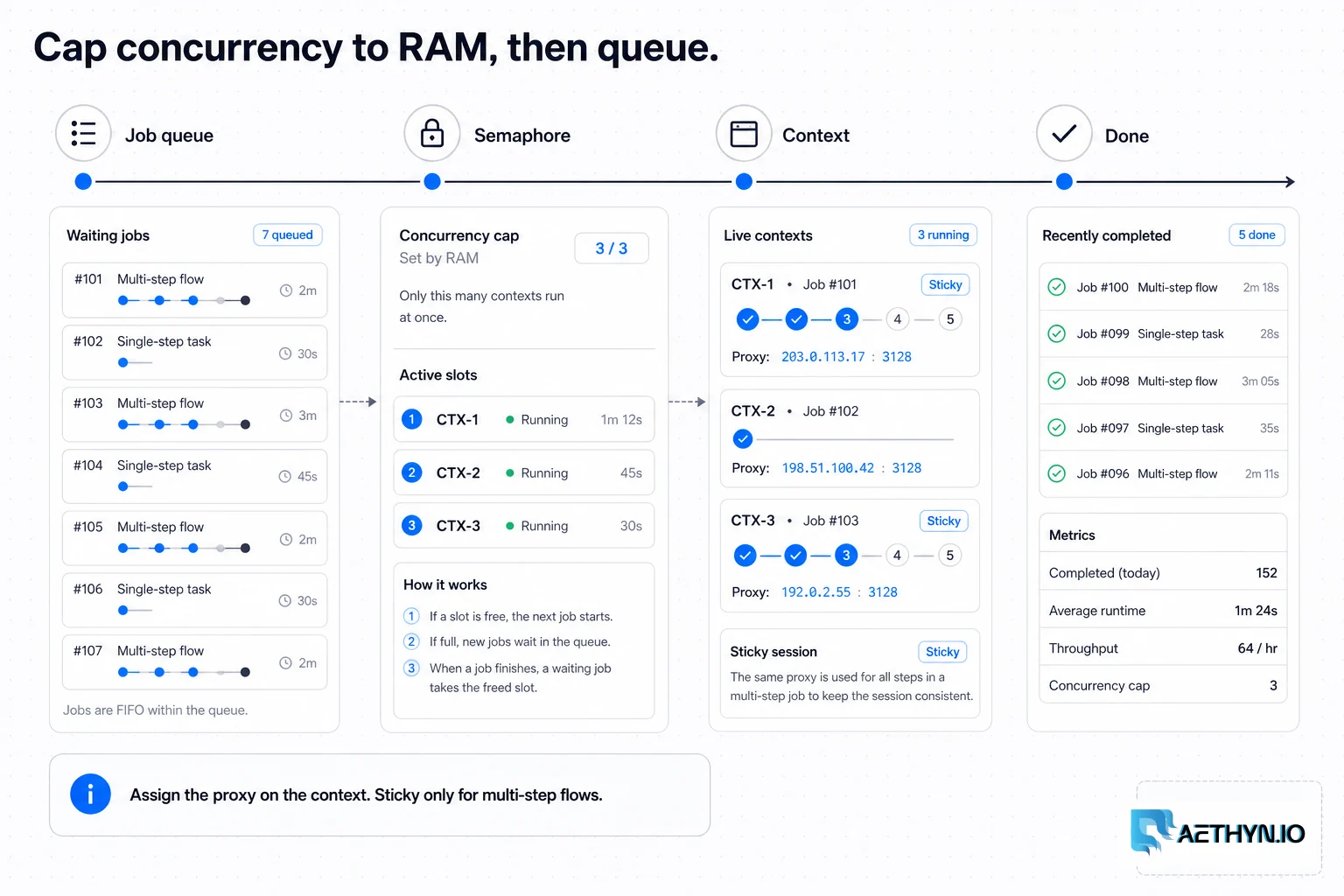
Set the proxy on new_context, not on launch, so each job can use a different IP. Use a rotating username for per-job rotation, or a sticky-session username when a single context must keep one IP across a multi-step flow (login → navigate → extract).
Node.js (per-context proxy + sticky)const { chromium } = require("playwright"); async function job(browser, url, sessionId) { const ctx = await browser.newContext({ proxy: { server: "http://proxy.aethyn.io:2099", // sticky: same IP for this context's whole flow username: `aethyn-XXXXX-country-us-session-${sessionId}-lifetime-10`, password: "PASSWORD", }, }); const page = await ctx.newPage(); await page.goto(url, { waitUntil: "domcontentloaded" }); const title = await page.title(); await ctx.close(); return title; }Field note: Match rotation to the task: per-context rotation for independent page fetches, a sticky session for any flow that sets cookies or logs in. Rotating IPs mid-session is the fastest way to get a flow flagged.
- 3
Block heavy resources to cut bandwidth
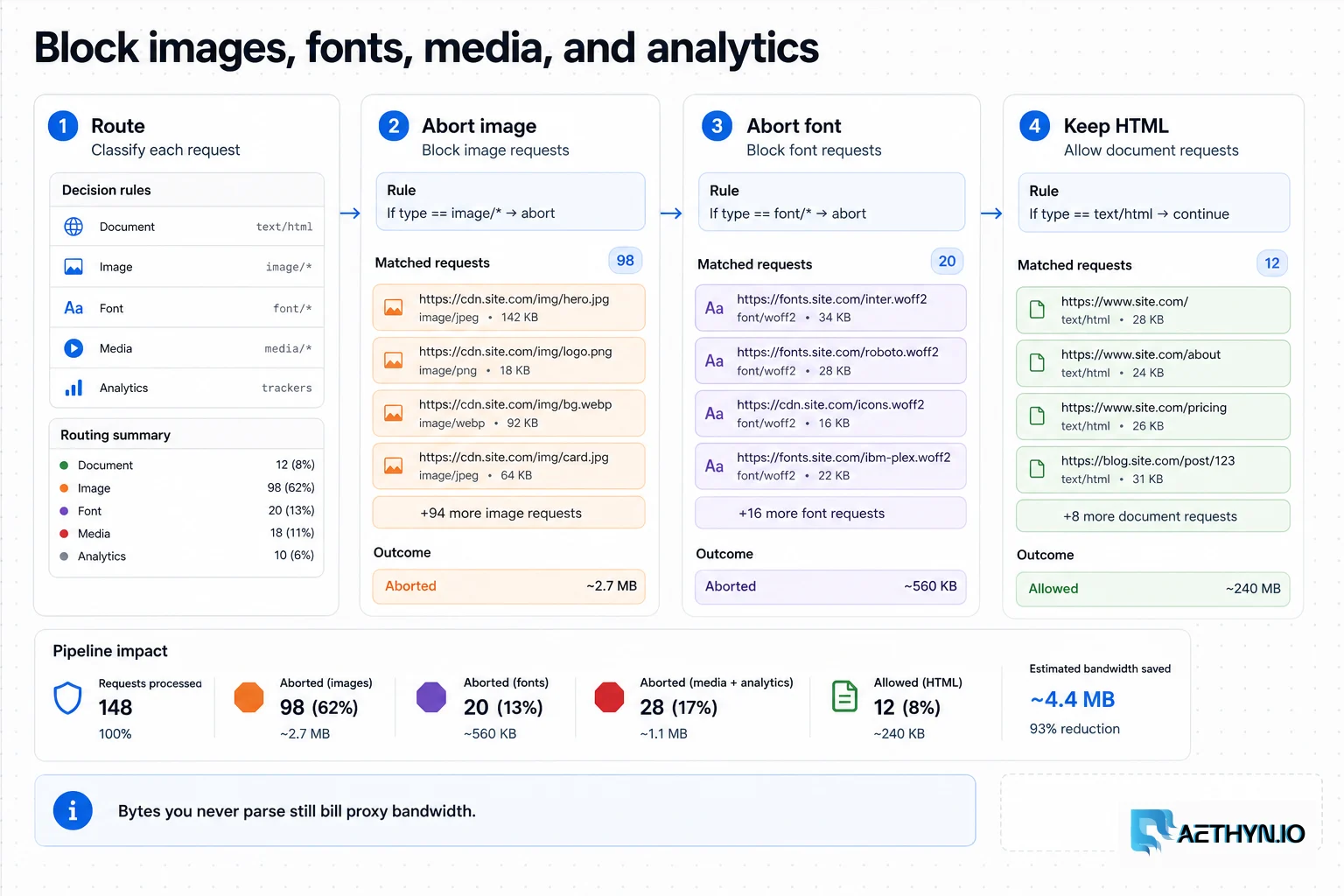
A scraper rarely needs images, fonts, media, or analytics. Intercept requests and abort those types — pages render their DOM far faster and you stop paying proxy bandwidth for bytes you throw away. This is often the single biggest cost and speed win at scale.
Python (route + abort)BLOCK = {"image", "media", "font"} async def make_lean_context(browser, **kw): ctx = await browser.new_context(**kw) async def route(r): if r.request.resource_type in BLOCK: await r.abort() else: await r.continue_() await ctx.route("**/*", route) return ctxField note: Blocking images/fonts/media commonly cuts page bytes by 70-90%. With per-byte proxy billing that's a direct, large cost reduction — verify the data you need still loads (some sites lazy-load content as images).
- 4
Cap concurrency to your real limits
Each context consumes meaningful RAM, so size concurrency to memory, not optimism. Use a bounded queue and a fixed worker count; measure peak RSS per context and set workers = (available RAM × safety factor) / per-context RAM. An overcommitted host is slower than a smaller, stable one.
Field note: domcontentloaded plus an explicit wait for the selector you need is usually faster and more reliable than networkidle, which can hang on sites with long-polling or analytics beacons that never go quiet.
- 5
Make jobs idempotent and observable
Persist results per URL so a crash resumes instead of restarting, set timeouts on every navigation and action, and log per-job duration, bytes, and outcome. At scale you need to see which targets are slow, heavy, or blocking so you can tune workers and rotation.
Best practices that keep scrapers reliable
- Reuse a small browser pool; open and close a context per job
- Set the proxy on the context for per-job rotation
- Use sticky sessions only for multi-step flows
- Block images/fonts/media to slash bandwidth and time
- Size concurrency to measured per-context RAM
- Recycle browsers periodically and make jobs idempotent
Common mistakes that burn proxy budget
- Launching a browser per URL and exhausting memory
- Running every job through one shared context and IP
- Loading full pages and paying for unused images/fonts
- Waiting on networkidle and hanging on chatty sites
- Unbounded concurrency that thrashes the host
- No result persistence, so a crash means restarting the whole run