

What goes wrong when this scraper fails
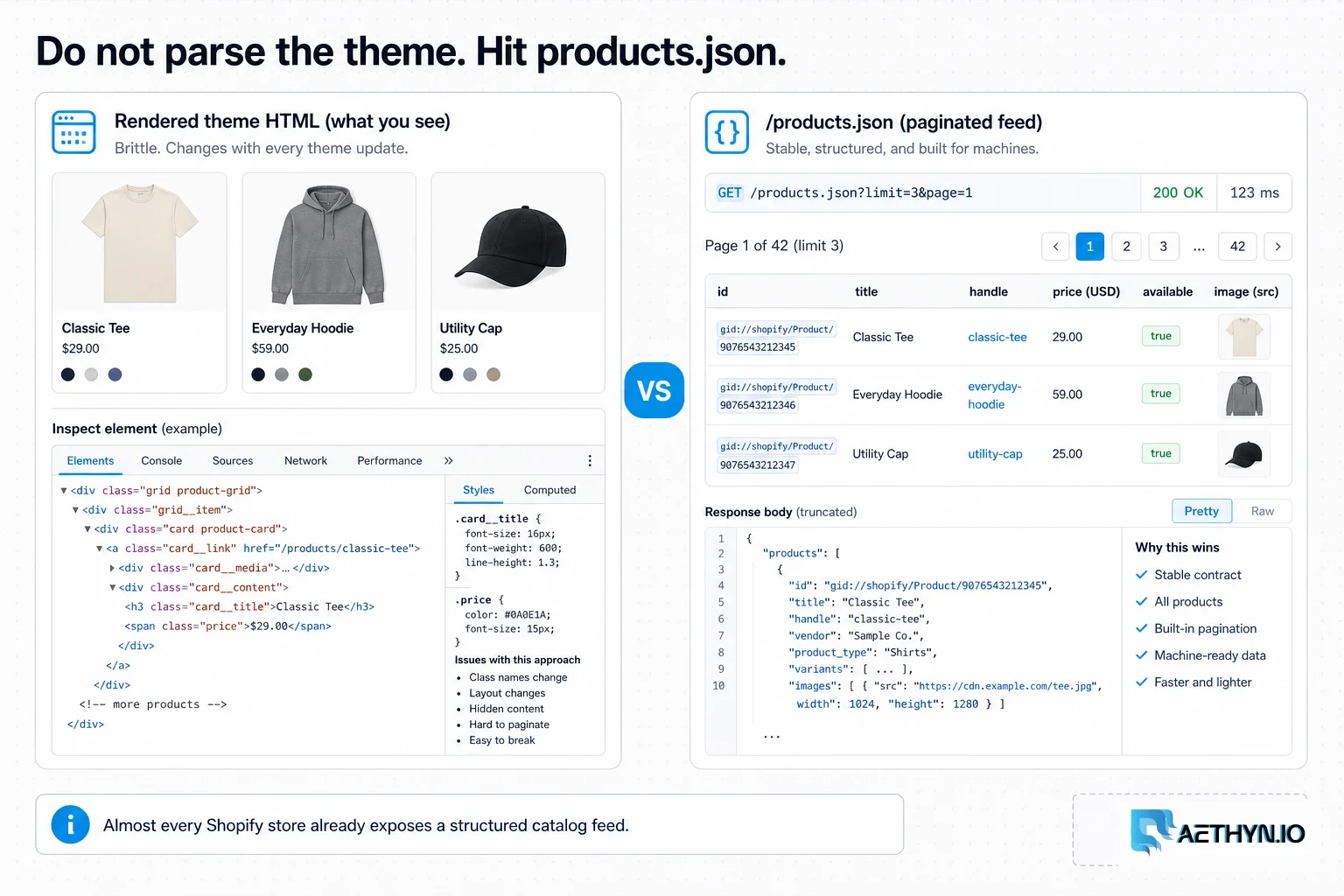
A brand wants to watch competitors' Shopify catalogs — new products, price changes, what's selling out — across dozens of stores, refreshed daily. The instinct is to build a browser-based scraper per store and fight each theme's markup. That's slow, brittle, and overkill, because Shopify ships a standardized, public JSON API on every store. The real task is using that feed efficiently, handling the minority of stores that restrict it, and polling reliably without getting rate-limited from a single IP.
Why this failure mode happens
Shopify is a hosted platform, so every store shares the same underlying endpoints — most usefully /products.json, a paginated feed of the catalog intended for legitimate integrations. Because it's standardized, one client works across every Shopify store with no per-theme parsing. The friction is operational: recurring polling from one IP triggers Shopify's platform rate limits, and a subset of merchants disable the endpoint, so you need fallbacks and IP rotation rather than clever HTML parsing.
Challenges that make this hard to automate
- Knowing the /products.json feed exists instead of scraping rendered HTML
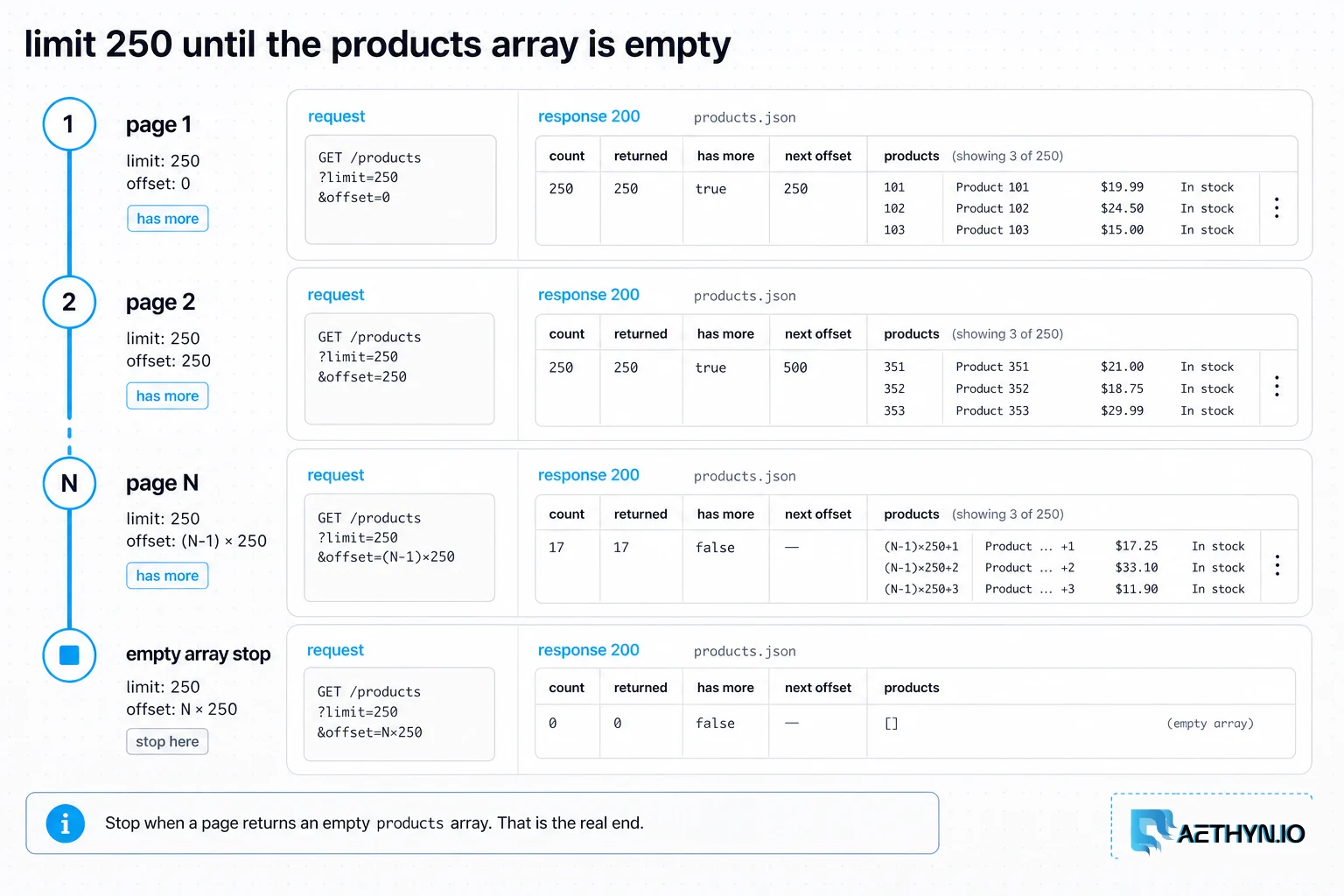
- Paginating the feed correctly and detecting the true end
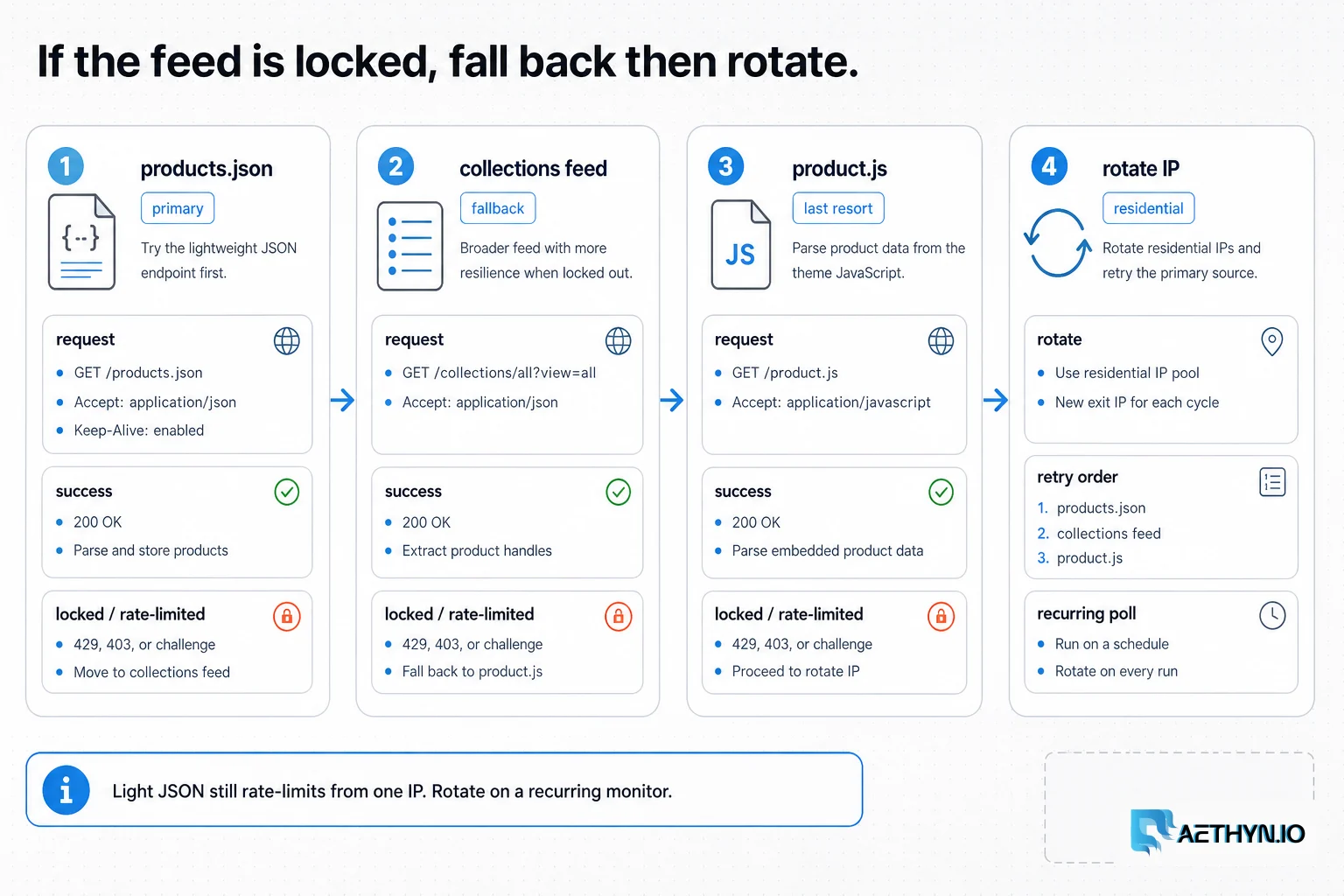
- Stores that disable /products.json and need a fallback
- Platform rate limits on recurring polling from one IP
- Modeling variants, which carry their own price and availability
Approaches that usually fail
- Headless-browser scraping per store — slow, brittle, and unnecessary on Shopify
- Theme-specific HTML parsers — break whenever a merchant changes themes
- Polling the JSON from one server IP — quickly rate-limited
- Manual catalog checks — impossible across dozens of stores daily
When residential proxies fix this — and when they cannot
The data access is easy on Shopify; reliability at frequency is the real need. Routing the /products.json polling through rotating residential IPs keeps per-IP request rates under Shopify's platform limits, so you can refresh many stores on a schedule without throttling. Country targeting also surfaces the correct currency and market where stores localize.
How Aethyn residential proxies help here
Shopify monitoring is high-frequency but lightweight per request, which is exactly the Premium tier's profile. Aethyn handles rotation and geography through the username.
- Premium residential pool — cost-efficient for frequent, light JSON polling
- Per-request rotation so recurring catalog refreshes stay under rate limits
- Country targeting for stores that localize currency and availability
- Sticky sessions for cart/checkout-based stock checks when needed
- Per-byte billing that keeps daily multi-store monitoring predictable
How to implement this with residential proxies
- 1
Pull the catalog from /products.json
Append /products.json to any Shopify store's domain to get a paginated JSON feed of its products — title, handle, vendor, product type, tags, images, and a variants array with prices and SKUs. No rendering, no theme parsing. Route it through a residential IP so recurring polling isn't rate-limited.
Python (requests)import requests PROXY = "http://aethyn-XXXXX-country-us:PASSWORD@proxy.aethyn.io:2099" proxies = {"http": PROXY, "https": PROXY} def fetch_page(store, page, limit=250): url = f"https://{store}/products.json" r = requests.get(url, params={"limit": limit, "page": page}, proxies=proxies, timeout=30) r.raise_for_status() return r.json().get("products", []) print(len(fetch_page("examplestore.com", 1)))Field note: limit=250 is the maximum page size Shopify honors. Using it cuts the number of requests (and proxy bandwidth) for a large catalog by up to 25x versus the default of 10.
- 2
Paginate until the feed is empty
Walk pages with ?page=N until a page returns an empty products array — that's the true end. Don't guess a page count; catalogs grow and a fixed cap silently truncates large stores.
Python (pagination)def fetch_catalog(store, max_pages=500): products, page = [], 1 while page <= max_pages: batch = fetch_page(store, page) if not batch: break products.extend(batch) page += 1 return productsField note: Each product's updated_at lets you do incremental syncs: after the first full pull, you only care about products whose timestamp changed, which keeps daily refreshes cheap.
- 3
Model variants — that's where price and stock live
On Shopify, the buyable unit is the variant (size, color), and each variant has its own price, SKU, and an available flag. Flatten products into variant rows so price tracking and stockout detection are accurate, and key on variant id for stability.
Python (flatten variants)def variant_rows(product): rows = [] for v in product.get("variants", []): rows.append({ "product_id": product["id"], "variant_id": v["id"], "title": f'{product["title"]} - {v["title"]}', "sku": v.get("sku"), "price": v.get("price"), # string, store currency "available": v.get("available"), }) return rowsField note: products.json doesn't always include inventory counts, but it does include the available boolean per variant — enough to detect sellouts and restocks over time without hitting cart endpoints.
- 4
Fall back when /products.json is disabled
A minority of merchants disable the global feed. You can usually still read per-collection feeds at /collections/<handle>/products.json, or a single product's JSON at /products/<handle>.js. Only fall back to a headless browser through the proxy if all JSON routes are closed.
Python (fallbacks)def product_json(store, handle): # Single-product JSON when the global feed is off url = f"https://{store}/products/{handle}.js" return requests.get(url, proxies=proxies, timeout=30).json() # Collection-scoped feed: # https://{store}/collections/{collection_handle}/products.json?limit=250&page=1Field note: Discover collection handles from the store's sitemap.xml (Shopify auto-generates /sitemap_products_1.xml and collection sitemaps). It's the cleanest way to enumerate what to poll when the global feed is restricted.
- 5
Schedule, rotate, and diff
Poll each store on a cadence through rotating residential IPs, store variant-level price and availability with timestamps, and diff against the last pull to detect new products, price changes, and sellouts. Alert only on meaningful changes to keep the signal clean.
Best practices that keep scrapers reliable
- Use /products.json with limit=250 instead of scraping HTML
- Paginate until an empty array; never hard-code a page count
- Flatten to variant rows and key on variant id
- Use updated_at for cheap incremental syncs
- Fall back to collection/product JSON before a headless browser
- Rotate residential IPs so recurring polling avoids platform rate limits
Common mistakes that burn proxy budget
- Building a headless-browser scraper when /products.json exists
- Writing theme-specific HTML parsers that break on theme changes
- Collapsing variants into one price and missing per-variant stock
- Stopping pagination at a fixed page and truncating large catalogs
- Polling many stores from one IP and getting rate-limited
- Ignoring the available flag and missing sellouts/restocks